IMGLAB 📷
Video Screenshot
One-click camera button on every video, on every website — including videos embedded inside iframes. Capture the exact frame you want, in JPEG, WebP, or PNG. No watermarks, no sign-up, completely free.
JPG · WebP · PNG
configurable
all_urls
100% free
The camera button appears automatically on every <video> element on any website — streaming platforms, news sites, personal blogs, video hosting services. No configuration, no whitelist. If there’s a video, the button is there.
Most video screenshot tools break when a video lives inside an embedded iframe from a different domain — the most common setup on the modern web. IMGLAB uses Chrome’s extension privilege (all_frames: true) to inject directly into cross-origin iframes, capturing the real video frame rather than a blank screenshot.
Default Ctrl+G. Customise any combo you want in Settings. Smart video picker selects the most relevant playing video on screen.
Canvas capture grabs the video’s native pixel dimensions — not the shrunk display size. Your screenshot is as sharp as the original stream.
Choose your output format. Adjust JPEG/WebP quality (10–100). PNG is lossless. All images save instantly with a meaningful filename.
Files are named IMGLAB-PageTitle-HH-MM-SS.jpg automatically. Even inside cross-origin iframes, the title is fetched from the top page.
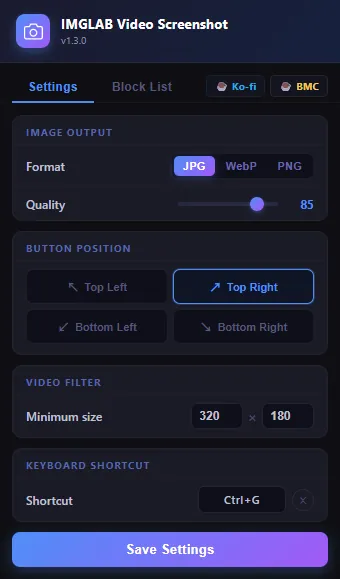
Everything Configurable — No Clutter
The popup is clean and fast. Two tabs: Settings and Block List. Change output format, quality, button position, minimum video size, and keyboard shortcut — all in one place. Settings sync instantly to every open tab via chrome.storage.sync. No page refresh needed.
- ✓ Format toggle: JPG / WebP / PNG
- ✓ Quality slider: 10–100 (dimmed automatically for PNG)
- ✓ Button position: 4 corners, plus bottom offset for player bars
- ✓ Click-to-record custom keyboard shortcut
- ✓ Min video size filter — ignore tiny thumbnails
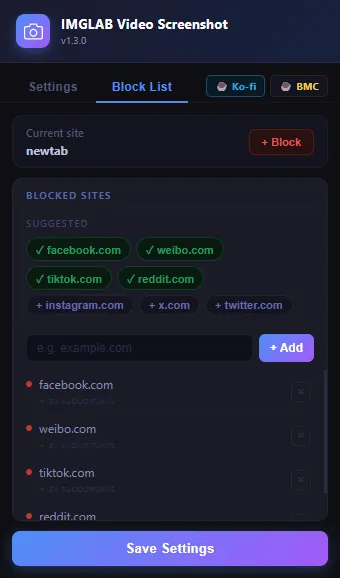
Per-Domain Blocking — You’re in Control
Some sites behave badly when third-party scripts inject elements into their video players. The Block List lets you disable the extension on specific domains entirely — including all subdomains. Pre-filled with confirmed-problematic sites, plus one-click chips for common social platforms.
- ✓ Block the current site with one click
- ✓ Suggested chips for common social platforms
- ✓ Manual domain input — strips https://, www., trailing paths
- ✓ Blocks domain + all subdomains automatically
- ✓ Removable at any time — changes take effect instantly
Draws the video frame onto an HTML5 canvas at native resolution. Fast, pixel-perfect, captures exactly the current frame including any overlaid subtitles baked into the stream. Used whenever the video source is accessible from the same origin.
If the canvas throws a SecurityError (video from a different domain — very common on streaming sites), the extension automatically falls back to chrome.tabs.captureVisibleTab, then crops the full-tab screenshot precisely to the video element’s bounding rectangle using getBoundingClientRect() × device pixel ratio. The crop accounts for iframe offsets when the video is inside an embedded player.
Sandboxed iframes silently block direct downloads. IMGLAB detects this and relays the download through the top-level frame via postMessage, where a Blob URL + anchor click always works reliably. Your file arrives with the correct IMGLAB-PageTitle-HH-MM-SS.jpg filename — never a generic “download.jpg”.
Press Ctrl+G (or your custom combo) and the extension intelligently selects the best video on screen — prioritising currently-playing videos, then the one closest to the centre of your viewport.
If no video is found in the main page, the shortcut is broadcast via postMessage to all child iframes. Whichever iframe has an active video captures it and reports back — no warning, no fuss.
Click the shortcut display in Settings to start recording. Press any key combination with optional Ctrl, Alt, and Shift modifiers. Reset to default with one click.
The camera button appears on hover over any qualifying video. It fades out while the video is playing and reappears on pause — so it never gets in the way of what you’re watching.
- ✓ Appears on hover — disappears automatically during playback
- ✓ Reappears when video is paused
- ✓ 4 configurable positions: Top-Left, Top-Right, Bottom-Left, Bottom-Right
- ✓ Bottom positions have 54px offset to clear player control bars
- ✓ Position changes live — all buttons update immediately without refreshing
- ✓ Minimum size filter skips tiny thumbnail previews and ad players
- ✓ Polls every 1.5 seconds + MutationObserver to catch dynamically loaded videos
Top-right is default · all 4 positions available
Most websites work fine with IMGLAB. But a small number of large platforms have engineering choices at the infrastructure level that make compatibility impossible — not difficult, impossible. We’ve done the investigation, and blocking these sites by default is the honest decision rather than pretending the extension works when it doesn’t.
MutationObserver anti-tamper system that watches for any DOM changes to its video container. The moment our button is appended, TikTok’s internal state resets — which immediately pauses and freezes the video. We investigated this thoroughly (confirmed via three separate debugging sessions) and ruled out every other cause. The freeze is triggered by our button element existing in the DOM. Not fixable without reverse-engineering TikTok’s anti-tamper code.<video> elements in the way our extension detects them. The content script scans for <video> tags but Reddit’s player architecture means none are found — so the button never appears and the keyboard shortcut returns “no active video found”. Since the extension doesn’t do anything useful on Reddit, we block it to avoid confusion. No video element found.We believe in being upfront. These are real limitations, most of them imposed by web platform security boundaries or platform-specific engineering choices outside our control.
When the cross-origin fallback is used, the full visible tab is captured then cropped to the video area. Any player UI layered on top of the video — control bars, “click to expand” banners, loading spinners — will appear in the screenshot. This is a fundamental constraint of how captureVisibleTab works. We can’t peer through the overlay to the raw video pixels without browser-level access we don’t have.
Videos protected by Widevine, PlayReady, or other DRM systems render on a protected compositing layer that extensions cannot access. Canvas capture will return a black frame. This is intentional and enforced by the OS / GPU driver — no browser extension can bypass DRM. If you see a black screenshot, the video is DRM-protected.
The “Screenshot saved!” notification is always appended to the correct element in fullscreen mode. However, on certain sites with cross-origin iframe players, Chrome suppresses repaints inside fullscreen iframes when DevTools is closed — meaning the toast may not be visible even though the screenshot was captured successfully. The file will still be in your Downloads folder.
The web is vast and every site engineers their video player differently. We work on the vast majority of video sites, but we can’t test every one. If the extension doesn’t work on a site you care about, let us know via a donation message — sites with enough user demand get prioritised in future updates.
Get the zip from the Chrome Web Store or our download page. Unzip to a permanent folder — the folder must stay in place as long as the extension is installed.
Go to chrome://extensions/ and toggle Developer Mode (top right). Then click “Load unpacked” and select your unzipped folder.
Find the extension in your toolbar (🧩 puzzle icon), click ⋮, then “This can read and change site data” → On all sites. Required for cross-origin iframe support.
Hover over any video and click the camera button. Or press Ctrl+G anywhere on the page. That’s it.
FREE · OPEN · COMMUNITY-SUPPORTED
This Extension Lives on Your Support
IMGLAB Video Screenshot is completely free — no ads, no paywall, no data collection. Development, testing, and compatibility research takes real time. Every donation directly funds the next update.
Whether we support more sites in the future honestly depends on how many people find this useful enough to chip in. If you’ve saved a screenshot you’re happy with — consider buying us a coffee.
One-time · No account needed · Any amount helps · 30 seconds
Built with ❤️ by IMGLAB
Ko-fi ·
Buy Me a Coffee ·
[email protected]