
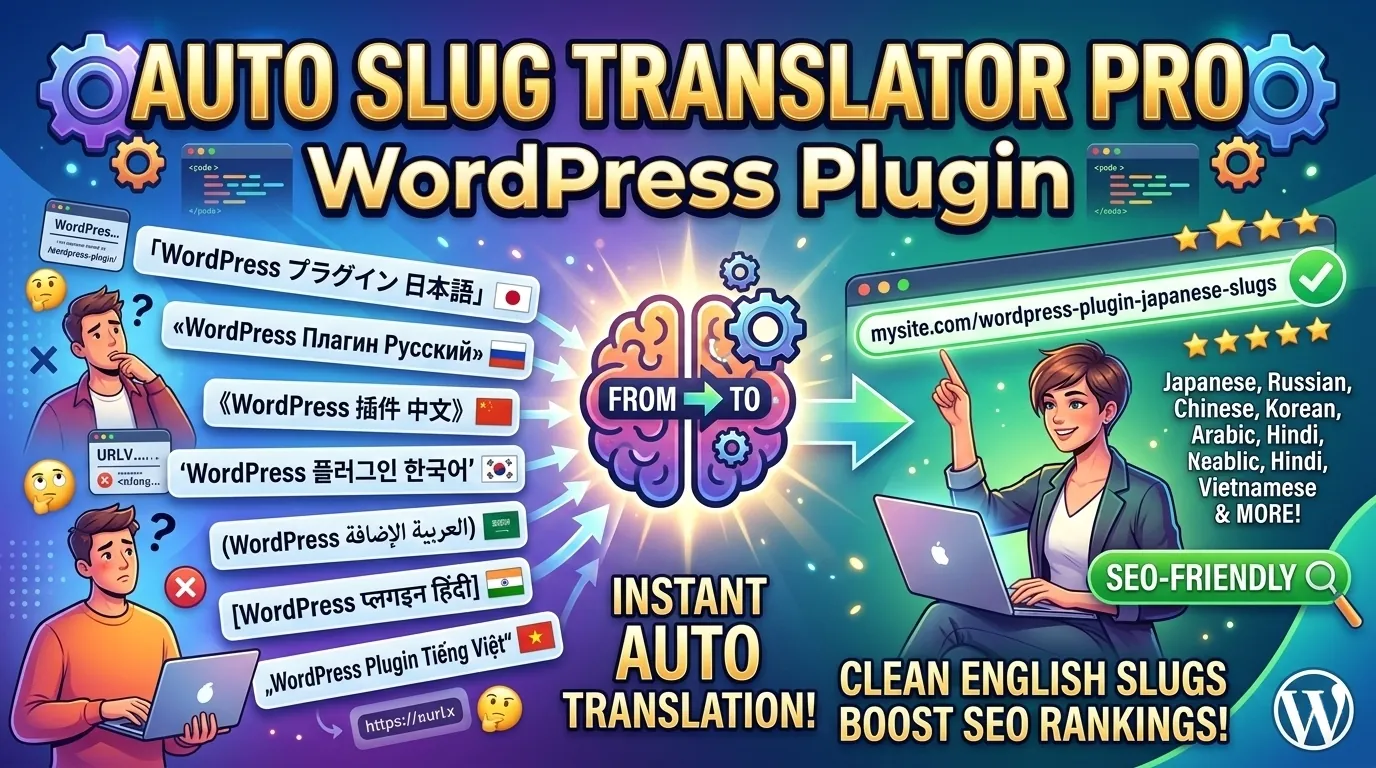

Auto Slug Translator Pro
The only WordPress plugin that automatically translates Japanese, Russian, Chinese, Korean, Arabic, Hindi, Vietnamese and more non-ASCII post titles into clean, SEO-friendly English URL slugs — on every save, with zero setup.
WordPress generates URL slugs directly from your post title. When your title contains Japanese, Korean, Arabic, or any non-ASCII characters, the result is a percent-encoded URL that looks like this:
yoursite.com/%E6%9D%B1%E4%BA%AC%E3%83%A9%E3%83%BC%E3%83%A1%E3%83%B3%E3%81%AE%E5%BA%97/
This broken URL causes real damage:
Twitter, LINE, Facebook — percent-encoded URLs get truncated or flagged by spam filters. Your shared links look broken and untrustworthy.
Search engines prefer clean, readable URLs with real English keywords. Percent-encoded slugs carry zero keyword value and look unprofessional in search results.
Nobody can type or remember a URL full of percent signs. Clean URLs get shared. Broken URLs get ignored.
Analytics tools, sitemap generators, and some CDNs have trouble processing percent-encoded URLs correctly. Clean slugs just work everywhere.
yoursite.com/tokyo-ramen-restaurant-guide/
Auto Slug Translator integrates seamlessly into every part of the WordPress editor. Wherever you work, the translate button is right there.
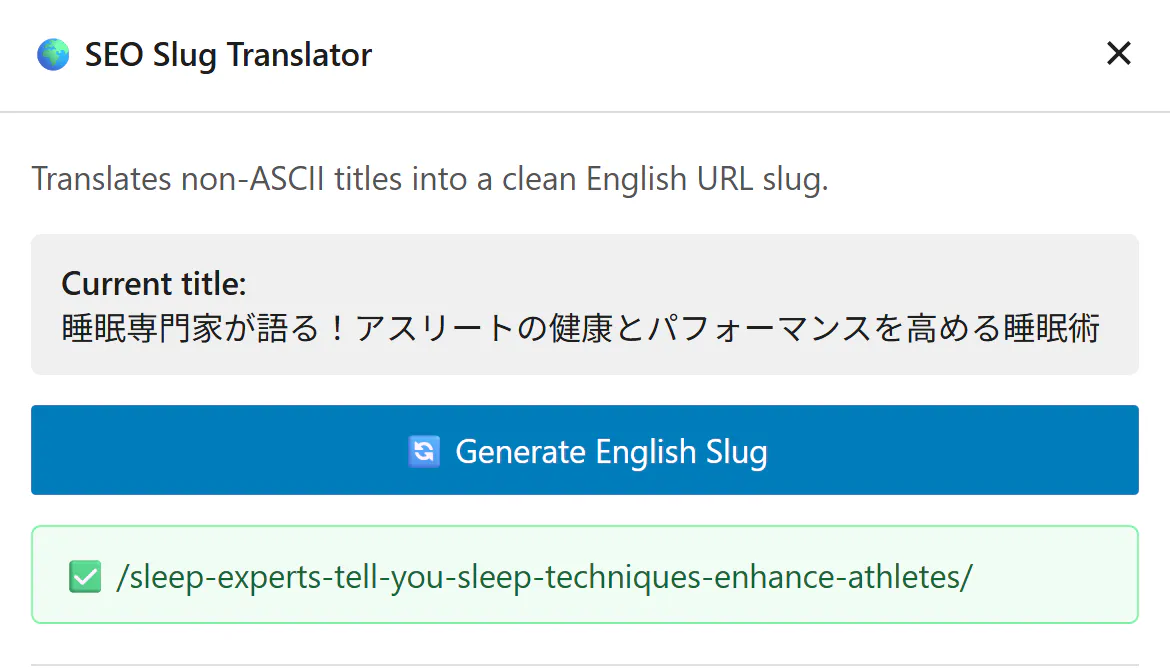
Sidebar Panel — Always One Click Away
A dedicated plugin panel appears in the Gutenberg sidebar. Click the icon at any time to generate a clean English slug instantly — without saving the post first. Shows the current title and gives you a one-click translate button.
- Shows current post title before translating
- One-click slug generation
- Saves to database immediately — no post save needed
- Shows ✅ success or ❌ error message inline
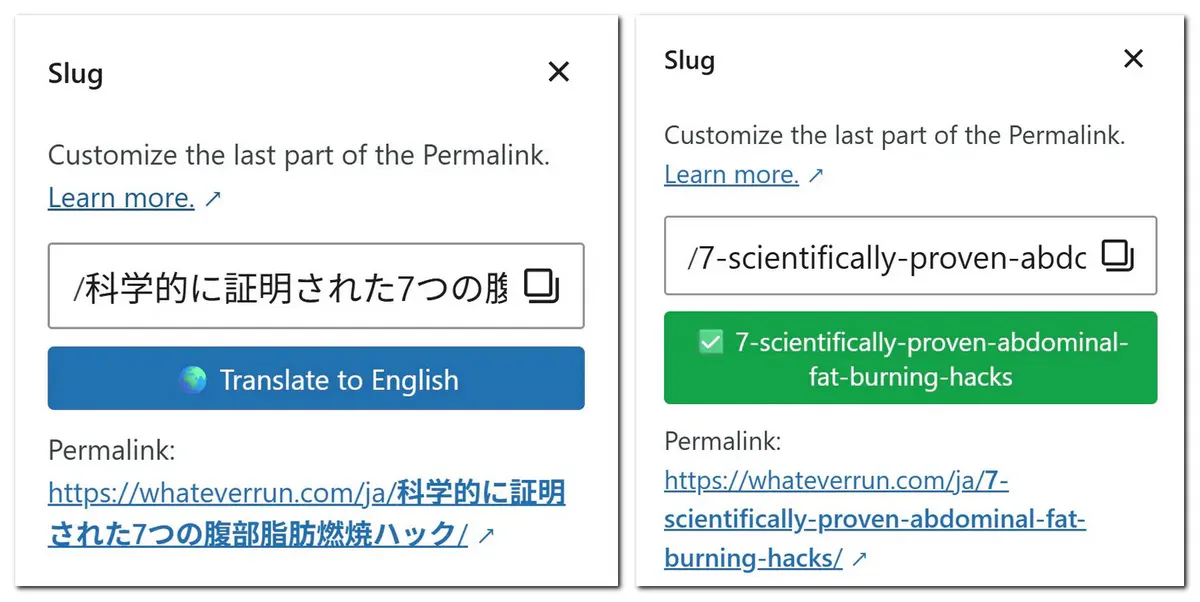
Translate Button Inside the Slug Popover
When you click the permalink area in Gutenberg to edit your slug, a “🌍 Translate to English” button appears automatically — right inside the native WordPress slug popover. No need to open any extra panel.
- Only appears when title contains non-ASCII characters
- Fills slug field and updates Gutenberg state instantly
- Popover stays open while translating
- Button turns green after success — no accidental re-translation
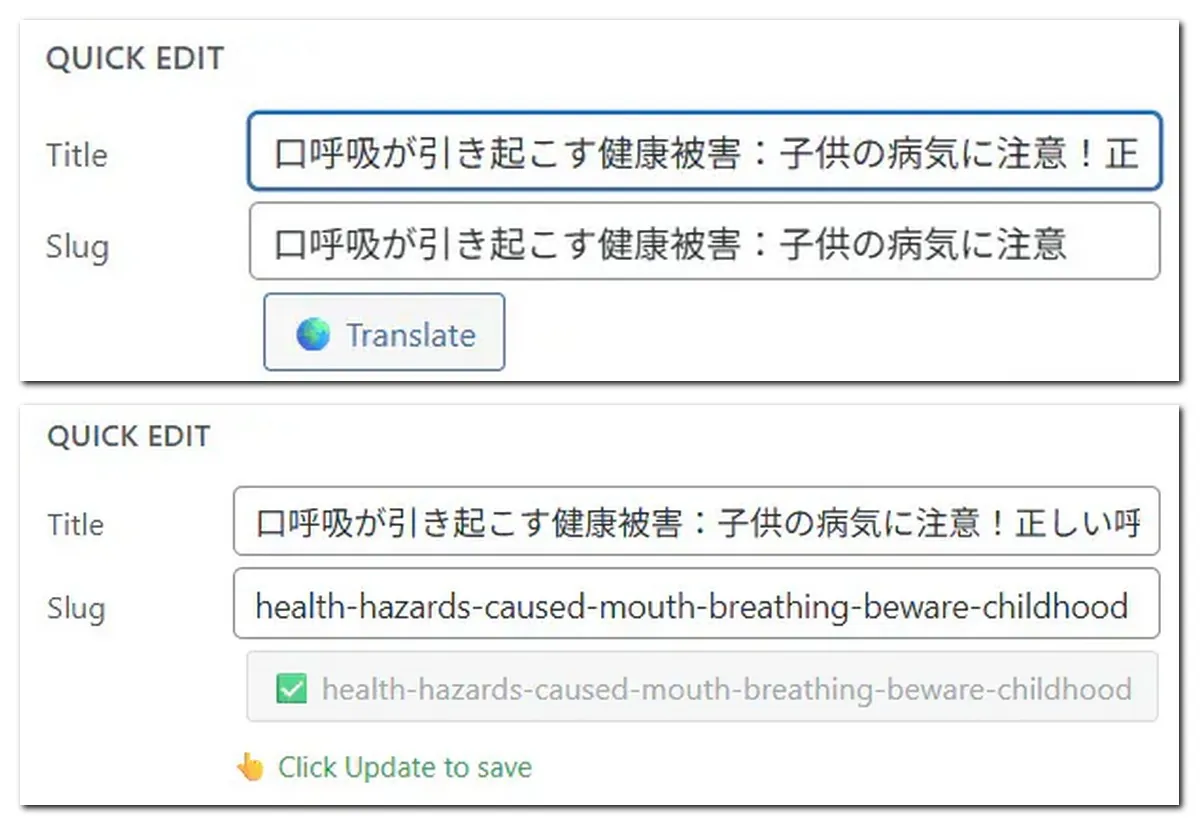
Quick Edit — Fix Slugs Without Opening Posts
On the Posts list screen, the Quick Edit panel gets a translate button right next to the slug field. Fix a broken slug without opening the full editor — perfect for cleaning up individual posts quickly.
- Only shown when title or slug contains non-ASCII
- Fills slug field instantly via Ajax
- 💾 Click Update to save reminder appears after translation
- Works on both posts and pages
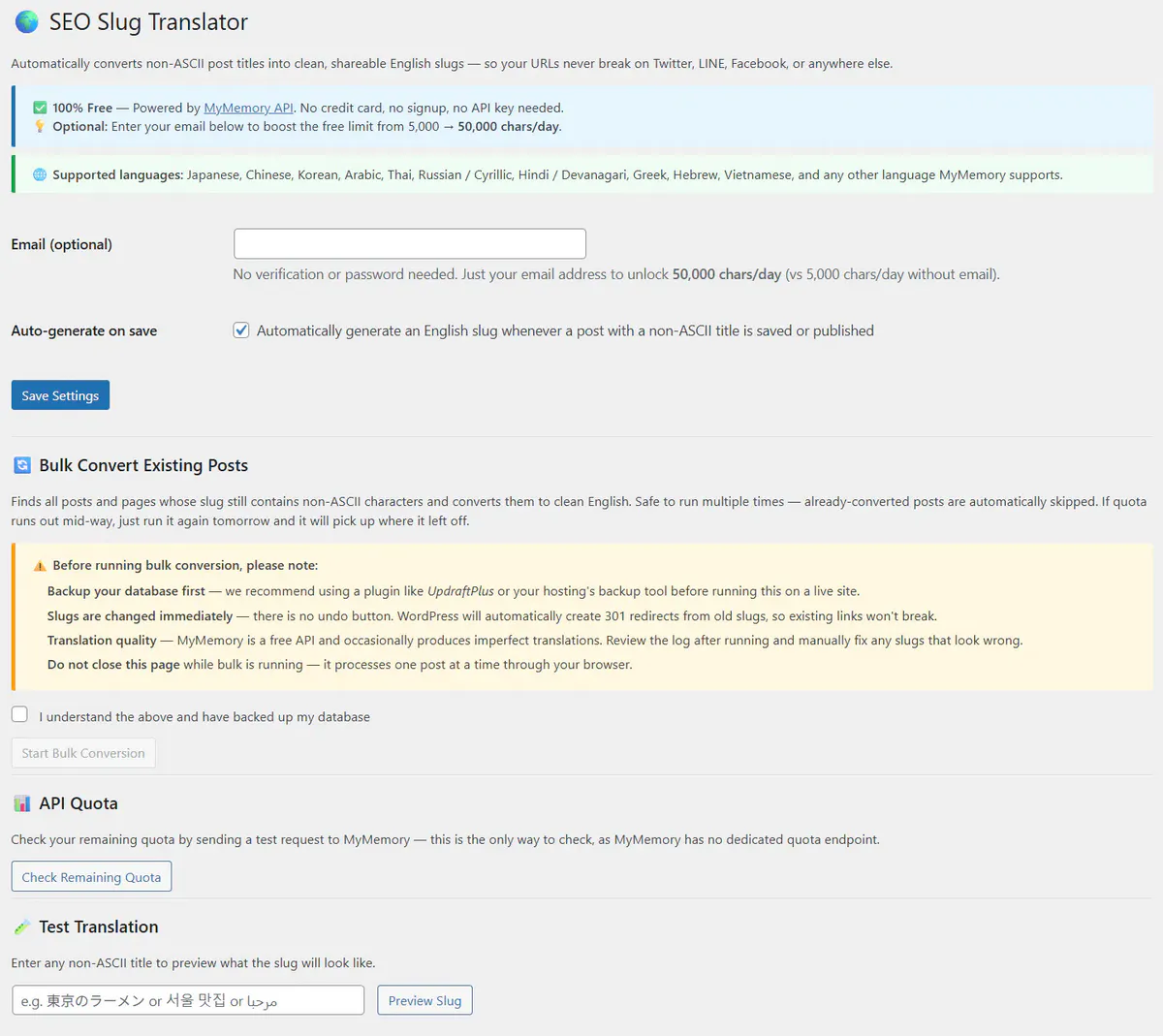
Pro Settings — Bulk Convert, Quota Checker & More
The Pro settings page unlocks powerful tools. Bulk Convert finds every post with a non-ASCII slug and cleans them all automatically — safely, one at a time, with a live progress counter.
- Email field — unlocks 50,000 chars/day quota
- Bulk Convert with Pre-Run Scan — zero API quota used for scanning
- Stop anytime — safe and resumable on any size site
- API Quota Checker — green ✅ / red 🔴 status
- Test Translation tool — preview any title before committing
- Japanese UI translation included
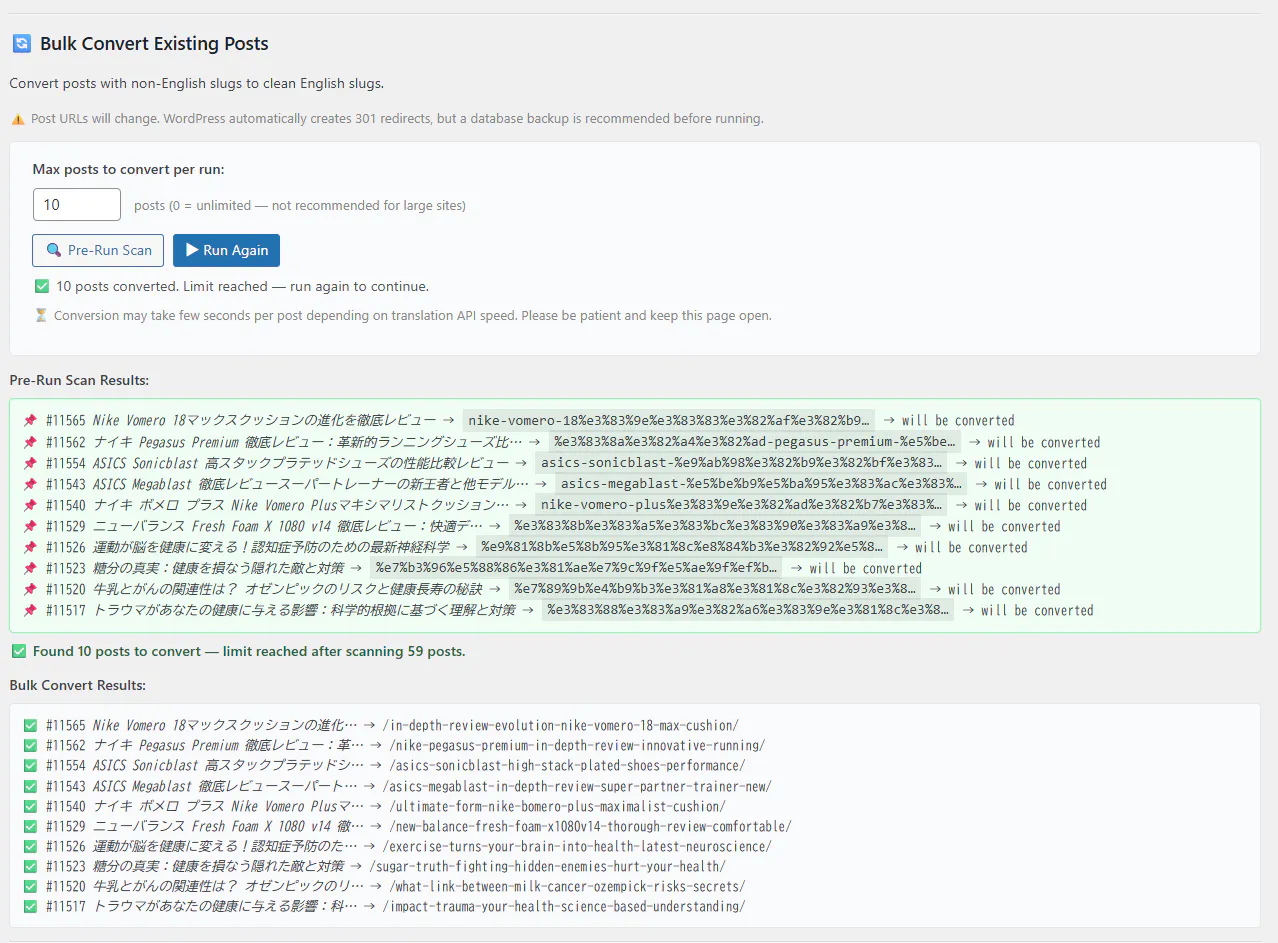
Bulk Convert — Translate Every Post Slug in One Run
Just migrated from another CMS? Running a blog with years of Japanese posts? Have hundreds of percent-encoded slugs you need to clean up at once? Bulk Convert handles it all — safely and automatically. Pages are intentionally excluded: they’re too important to bulk-process, and are best reviewed and updated one by one.
- Pre-Run Scan — Before converting a single post, scan your entire site to see exactly which posts have non-ASCII slugs and how many. Zero API quota used — full preview with no commitment.
- Set Max Posts Per Run — Control how many posts are converted in one run. Match it to your daily API quota — convert 50 today, 50 tomorrow. Never waste quota, never hit limits mid-run.
- Live Progress Log — Watch every conversion in real time. Each line shows the post title and the generated English slug. You always know exactly what changed.
- Stop Anytime — Smart Skip on Next Run — Stop mid-run whenever you want. On the next run, posts already converted to English slugs are automatically skipped — only the remaining non-ASCII slugs are processed.
- Auto 301 Redirects — WordPress stores the old slug and issues a 301 redirect on every change. Every old link — from social, email, backlinks — keeps working. Google transfers SEO ranking to the new URL.
- Posts Only — By Design — Bulk Convert targets posts, where the volume is. Pages are excluded intentionally — they’re high-value and worth reviewing individually before changing.
| Feature | Free | ⭐ Pro — $9 |
|---|---|---|
| Auto-generate slug on save Hooks into save_post — works on every publish automatically |
✅ | ✅ |
| 10-language detection Japanese, Chinese, Korean, Arabic, Thai, Russian, Hindi, Greek, Hebrew, Vietnamese |
✅ | ✅ |
| Gutenberg sidebar panel Dedicated panel in the block editor toolbar |
✅ | ✅ |
| Slug popup button Translate button inside the native permalink popover |
✅ | ✅ |
| Quick Edit translate button Fix slugs from the post list without opening the editor |
✅ | ✅ |
| Test translation tool Preview any title’s slug before committing |
✅ | ✅ |
| 301 auto-redirect on slug change WordPress stores old slug — no broken links ever |
✅ | ✅ |
| Japanese UI translation Full Japanese interface — settings page, buttons, messages |
✅ | ✅ |
| Daily API quota MyMemory free translation API — resets midnight UTC |
5,000 chars ~35 Japanese titles/day |
50,000 chars ~350 Japanese titles/day |
| Email quota boost Register your email for 10× daily limit |
❌ | ✅ |
| Bulk Convert all existing posts Pre-Run Scan + set max posts per run + live progress log + Stop anytime — already-converted posts auto-skipped on next run |
❌ | ✅ |
| API Quota Checker Real-time quota status — green/red indicator in settings |
❌ | ✅ |
| Priority email support Direct support from IMGLAB — 48hr response on business days |
❌ | ✅ |
Enter your email in settings — MyMemory registers it and immediately bumps your daily limit from 5,000 to 50,000 characters. No account, no password, no credit card needed. Gmail plus-addressing works too: [email protected] gives each site its own independent quota.
Migrated from another CMS? Have hundreds of old posts with broken slugs? Run a Pre-Run Scan first to see exactly which posts will be converted — zero API quota used. Set your max posts per run, then watch the live progress log as each slug is translated. Stop anytime — on the next run, posts already converted to English slugs are automatically skipped, so only remaining non-ASCII slugs are processed. Posts only, by design — pages are intentionally excluded.
Before running a bulk conversion, check whether your daily quota is available. One click checks your daily quota and returns a clear green ✅ (quota available) or red 🔴 (exhausted) status — plus your registered email and plan details. Quota resets daily at midnight UTC.
Pro license holders get direct email support from the IMGLAB team. We respond within 48 hours on business days. Compatibility questions, translation quality issues, feature requests — we’re here. Free users can use the WordPress.org support forum.
When you save a post, the plugin scans the title using Unicode character ranges — no external API call needed. Japanese detected by Hiragana/Katakana/CJK ranges. Korean by Hangul. Arabic by its Unicode block. Detection is instantaneous and 100% accurate.
The title is sent to a free translation API used by millions of websites worldwide. Free plan sends anonymously (5,000 chars/day). Pro plan sends with your registered email (50,000 chars/day). Natural English translation returned in under a second.
The English translation is processed: converted to lowercase, common stop words removed (a, the, and, or, in, of…), non-alphanumeric characters replaced with hyphens, trimmed to 60 characters at a natural word boundary. Result: a short, readable, keyword-rich slug.
Before saving, the slug is passed through WordPress’s native wp_unique_post_slug(). If two posts translate to the same English slug, WordPress automatically appends -2, -3 etc. No duplicate slugs, ever.
Saved via wp_update_post() — the correct WordPress way, not raw database writes. WordPress automatically stores the old slug in _wp_old_slug and issues a 301 redirect. All old shared links keep working. Google transfers SEO ranking to the new URL. Nothing breaks.
| Language | Script / Detection | API Code | Example → Slug |
|---|---|---|---|
| 🇯🇵 Japanese | Hiragana, Katakana, CJK | ja | 東京ラーメン → tokyo-ramen |
| 🇷🇺 Russian | Cyrillic block | ru | Москва кафе → moscow-cafe |
| 🇨🇳 Chinese | CJK Unified + Extensions | zh | 北京美食 → beijing-food |
| 🇸🇦 Arabic | Arabic Unicode block | ar | مطبخ عربي → arabic-kitchen |
| 🇰🇷 Korean | Hangul Syllables | ko | 서울 맛집 → seoul-restaurant |
| 🇹🇭 Thai | Thai Unicode block | th | อาหารไทย → thai-food |
| 🇮🇳 Hindi | Devanagari block | hi | दिल्ली खाना → delhi-food |
| 🇬🇷 Greek | Greek + Extended | el | Αθήνα καφέ → athens-cafe |
| 🇮🇱 Hebrew | Hebrew block | he | תל אביב → tel-aviv |
| 🇻🇳 Vietnamese | Latin Extended + Combining | vi | Hà Nội ẩm thực → hanoi-cuisine |
Japanese is checked before Chinese because both use CJK characters — but Japanese has unique Hiragana/Katakana ranges that make detection unambiguous. Powered by a free translation API — no API key required.
- All Pro features unlocked immediately
- Email quota boost — 50,000 chars/day
- Bulk Convert — Pre-Run Scan + set max posts per run + live log + Stop anytime
- API Quota Checker — real-time status
- Japanese UI translation included
- 1 year of updates + priority support included
- License key never expires — Pro features stay unlocked
- License key delivered by email instantly
- 30-day money-back guarantee
Secure checkout · Credit card & PayPal accepted
wp_update_post, save_post, admin_menu) that have been unchanged for 10+ years. WordPress is very careful about backwards compatibility. If anything ever does break due to a WordPress update, Pro license holders with an active support period receive fixes as priority updates.$9 once. License never expires.
Join multilingual bloggers across Japan, Russia, the Middle East, China and beyond who’ve already cleaned up their WordPress URLs with Auto Slug Translator.
30-day money-back guarantee · License key by email · No subscription
Questions? [email protected]
Built with ❤️ in Tokyo by IMGLAB
WordPress.org Plugin Page ·
Support ·
imglab.net
❤️ Support the project
Keep IMGLAB innovating
If you find this tool useful, a small tip means the world and helps us build new tools, ship new features, and keep everything running smoothly.
No account needed · One-time or monthly · Takes 30 seconds