

IMGLAB 🧪
Image URL Exporter
Collect every original-resolution photo from any Twitter / X profile or hashtag search — with one click. Export a clean URL list, then batch-download thousands of images overnight. Built for Japanese and Chinese power users, artists, and photography communities.
collectable
collecting
JPEG export
required
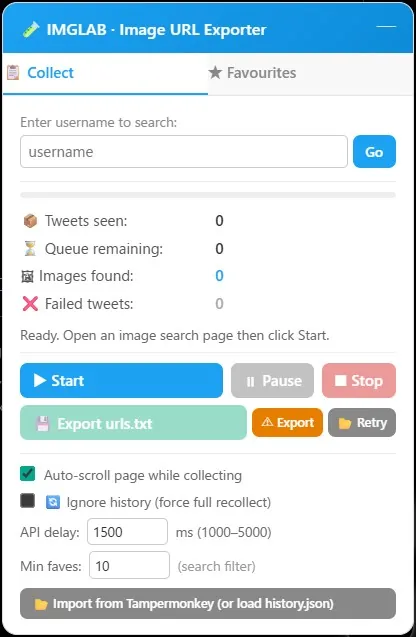
Everything You Need, Right on the Page
The IMGLAB panel lives in the bottom-right corner of x.com and twitter.com. It’s draggable, minimisable, and completely non-intrusive. Two tabs — Collect and Favourites — give you access to everything without ever leaving the page.
- ✓ Real-time stats: tweets seen, queue depth, images found, failed count
- ✓ Progress bar shows collection % at a glance
- ✓ Per-tweet download button injected into every tweet’s action bar
- ✓ History badge shows last download date + image count
- ✓ Top tab amber warning — knows when results are relevance-sorted
- ✓ Navigation guard prevents accidental data loss
Scrapes tweet IDs from the DOM as you (or the auto-scroller) scrolls, calls Twitter’s private GraphQL API for each tweet, and extracts every original-resolution photo URL. Exports a tab-separated urls.txt ready for the companion downloader.
A download icon is injected into every tweet’s action bar on x.com. One click fetches all photos in that tweet via the GraphQL API and downloads them immediately — no panel required. Already-downloaded tweets show a blue checkmark.
Configurable auto-scroll keeps loading new tweets while collection runs. Stops automatically when the page bottom is reached or when no new tweets appear after 8 scroll steps.
Remembers the newest tweet ID per user or hashtag. Next time you collect, IMGLAB automatically stops at the boundary — only grabbing new tweets since your last download. Zero duplicate work.
Star any user or hashtag to save them to the Favourites tab. One click takes you straight to their image search — with your configured min-faves filter already applied.
After each session, IMGLAB generates a until: search URL based on the oldest tweet found. Click Go Older to continue collecting further back in time — seamless session chaining.
Go to any Twitter profile media tab or run a from:username filter:images search. Open the IMGLAB panel (bottom-right) and click ▶ Start. The extension immediately scans all visible tweet articles.
Auto-scroll loads more tweets while the API queue processor works in the background. Each tweet ID is sent to Twitter’s TweetResultByRestId GraphQL endpoint — extracting all photo URLs, filenames, and timestamps. Rate limits are handled automatically with countdown timers.
When collection finishes, urls.txt downloads automatically — preventing data loss if you click Go Older without manually exporting. History (newest tweet ID) is saved to chrome.storage.local so the next session only collects new content.
Load the exported twitter_urls_username_xxx.txt into the IMGLAB Image Downloader (see below). It reads every URL, downloads images in parallel, skips already-existing files, and organises everything into named subfolders automatically.
When history exists for a user or hashtag, IMGLAB stops collecting the moment it hits a tweet ID already in your archive. Only new tweets since last download are queued — saving API calls and time.
If the URL contains until:, IMGLAB detects backfill mode and disables the history boundary check — letting you safely dig back through older archives without corrupting your newest-ID records.
When results are relevance-sorted (Top tab), IMGLAB shows an amber warning, skips the history boundary, and hides Go Older — because chronological position is meaningless in relevance sort.
Export a failed.txt of any tweets that errored. Load it back into IMGLAB with the Retry button — the extension re-queues exactly those IDs and tries again with fresh API calls.
Every exported image gets a structured filename packed with metadata — no guessing what file belongs to whom or when.
Searches combining multiple hashtags (e.g. #tag-a #tag-b) are handled correctly end-to-end — history, filenames, and folder names all stay consistent.
#tag-a #tag-bSpace-separated, # on each tag, sorted alphabetically. Identical between the extension and the downloader — no conversion needed.
twitter_urls_hashtag_tag-a_tag-b.txtUnderscore-joined, no #. The downloader automatically converts this back to the folder name #tag-a #tag-b — matching the storage key exactly.
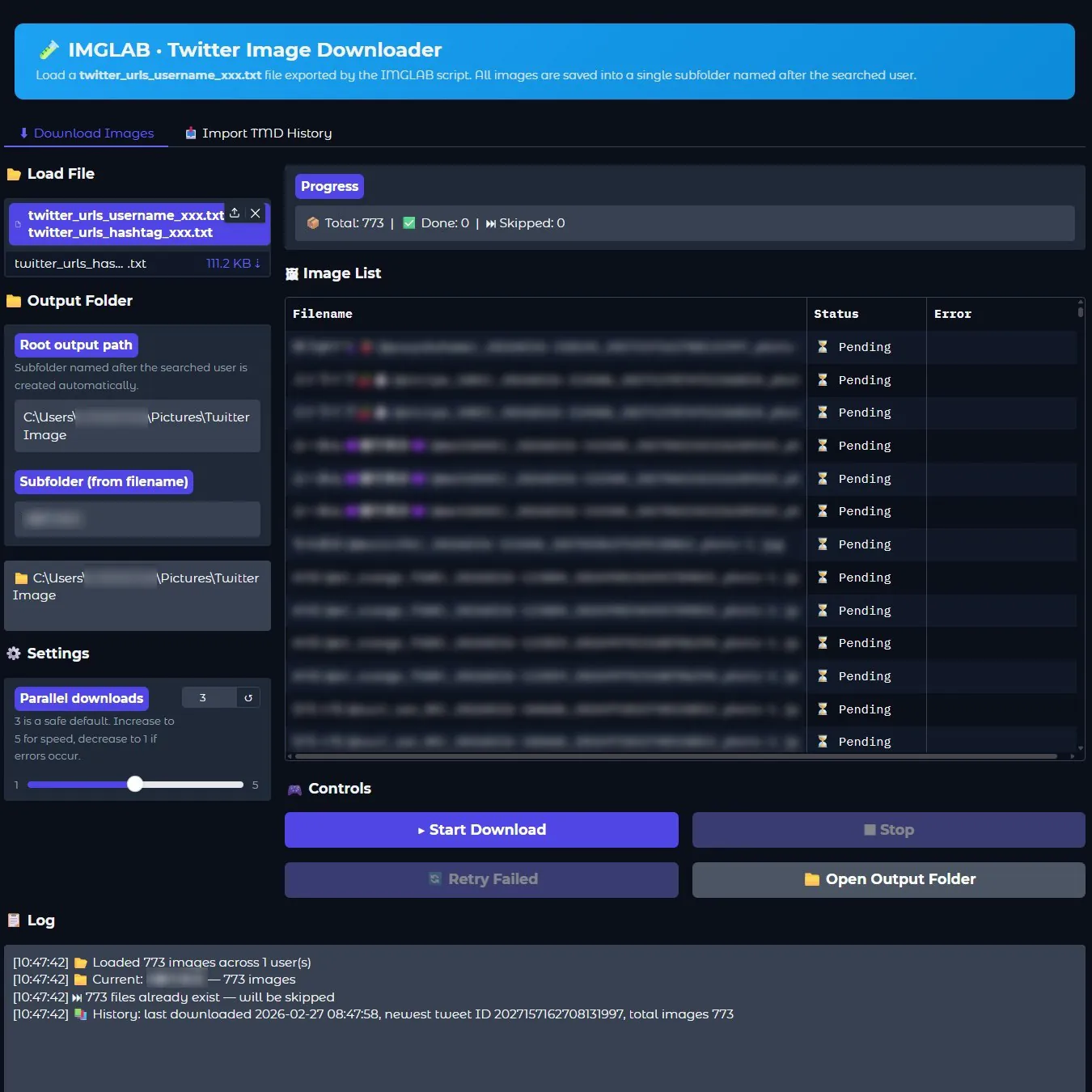
Batch Downloader with Full History Sync
Drop your exported urls.txt files onto the IMGLAB Image Downloader. It reads every line, downloads images in parallel, skips files already on disk, and organises everything into rich named subfolders. History syncs back to the Chrome extension automatically — so your next collection session knows exactly where you left off.
- ✓ Multi-file queue — load several txt files, they process in order
- ✓ 1–5 parallel downloads, configurable per session
- ✓ Skips already-downloaded files by filename check — no re-downloads
- ✓ Rich subfolder names:
DisplayName(@username) - ✓ History JSON syncs to extension via local API on port 7861
- ✓ Full download log with timestamps and error details
For username files, the subfolder is extracted from the first image’s filename — giving you サンプル太郎(@example_user) instead of a bare handle. Hashtag searches use #tag1 #tag2 format, matching the extension’s storage key exactly.
Load multiple users’ txt files at once. The downloader groups files by user, runs each group sequentially, and moves to the next automatically on clean completion. Stop mid-queue clears remaining entries safely.
Exposes GET /imglab/history on localhost. The Chrome extension’s background.js fetches this on startup — merging the downloader’s history with the extension’s local storage, always keeping the highest tweet ID.
Already have thousands of images from Twitter Media Downloader? The Import TMD History tab scans your existing folder structure and bootstraps IMGLAB’s history from your archive — so incremental collection starts from the right point.
Click Add to Chrome — Free above. The extension installs instantly from the Chrome Web Store. No sign-up, no account.
Go to any Twitter profile and open their media tab — or search from:username filter:images. The IMGLAB panel appears in the bottom-right corner automatically.
IMGLAB begins scanning tweets, calling the API, and collecting image URLs. Auto-scroll loads more content while you watch the stats update in real time.
Collection finishes and urls.txt downloads automatically. Load it into the IMGLAB Image Downloader (donation required for beta access) and let it run overnight.
Twitter’s GraphQL endpoints enforce rate limits. IMGLAB detects 429 responses, shows a countdown timer, and resumes automatically. Large collections (1000+ tweets) may need 1–2 pauses. This is unavoidable — it’s Twitter’s infrastructure, not ours.
IMGLAB collects photos (type: "photo") only. Videos, GIFs, and other media types are intentionally skipped. The focus is on high-quality still images at original resolution.
The extension uses your own browser session. It can only collect tweets you can see while logged in. Private accounts you don’t follow, age-restricted content, and deleted tweets are not accessible.
Twitter changes its GraphQL endpoints occasionally. When this happens, collection will fail until we push an update. This is the main ongoing maintenance burden for this type of extension.
FREE · OPEN · COMMUNITY-SUPPORTED
Keep IMGLAB Alive & Updated
The extension is free. No ads, no data collection, no subscriptions. Every update — fixing broken API endpoints, adding features, testing multi-tag edge cases — takes real time and research. Your support funds all of it.
Donors will receive a cryptographic Donation Key that permanently unlocks Pro features. One donation, lifetime access. The key works completely offline — no server dependency, no expiry.
One-time · Any amount · No account needed · Downloader beta access included
Built with ❤️ by IMGLAB
Ko-fi ·
Buy Me a Coffee ·
爱发电 ·
[email protected]