
Collect Every
Photo on X / Twitter
Complete walkthrough — from install to batch download. One extension that collects thousands of original-resolution images while you sleep.
Install in 2 Minutes
IMGLAB Image URL Exporter is a Chrome extension. Install it once and the panel appears automatically on every x.com and twitter.com page you visit.
Click Add to Chrome — Free on the product page. Chrome will prompt you to confirm — click Add extension. The IMGLAB icon 🧪 will appear in your Chrome toolbar. No sign-up, no account, no payment required.
Go to any Twitter profile and open their Media tab (the photo/video grid). Or use the search bar to run a query like:
The IMGLAB panel will appear automatically in the bottom-right corner of the page. If it doesn’t appear, click the 🧪 icon in the toolbar and press “Toggle Panel on Page”.
In the IMGLAB panel, click ▶ Start. The extension begins scanning tweets, calling the Twitter API, and collecting image URLs. Auto-scroll loads more content while you watch the stats update in real time.
When collection finishes, urls.txt downloads automatically to your Downloads folder. Load it into the IMGLAB Image Downloader (separate app, beta — donation required) to batch-download every image into organised subfolders. Or use any other batch download tool that accepts a URL list.
Panel Walkthrough
The IMGLAB panel is injected into x.com — it’s draggable, minimisable, and non-intrusive. Here’s what every element does.
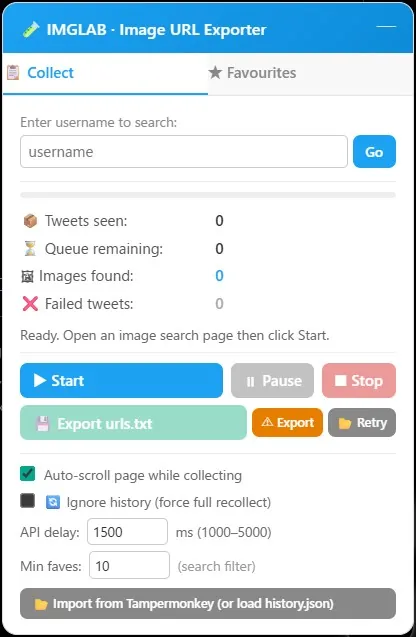
Displays the current user or hashtag IMGLAB has detected from the URL. For a profile page it shows 👤 @username; for a search it shows 🔍 Update Search. The ★ star button saves the current user or hashtag to Favourites. The Update Search button rebuilds the search URL with your current min-faves filter applied.
If you’ve previously collected from this user or hashtag, a green badge shows your last download date and total image count. This tells you at a glance how up-to-date your local archive is.
If you’re on the Top tab of a search (relevance-sorted, not chronological), an amber warning banner appears. In this mode: the history boundary check is skipped, history will not be saved after the session, and the Go Older button is hidden — because relevance sort has no reliable date ordering.
f=live) for incremental collection with history tracking.Four counters update in real time during collection:
📦 Tweets seen — total tweet IDs found in the DOM
⏳ Queue remaining — tweets still waiting for API processing
🖼 Images found — photo URLs successfully extracted (blue)
❌ Failed tweets — tweets that errored after all retries (red if > 0)
The progress bar below fills as the queue is processed: % = processed / total seen.
▶ Start — begins a new collection session. Disabled after a session completes (navigate to a new page or use Go Older to start again).
⏸ Pause / ▶ Resume — pauses API processing and auto-scroll. Queue is preserved. Click again to resume exactly where you left off.
⏹ Stop — stops collection immediately. If not in backfill or Top tab mode, prompts you to save history at the current point.
💾 Export urls.txt — downloads the collected image list as a tab-separated text file. Also triggers automatically at end of session.
⚠ Export — exports a failed.txt of tweet URLs that couldn’t be processed, for manual retry.
📂 Retry — loads a previously exported failed.txt back into IMGLAB to retry those specific tweets.
Auto-scroll — automatically scrolls the page during collection to load more tweets. Enabled by default.
Ignore history — forces a full recollect even when history exists. Use this to completely refresh an archive.
API delay — milliseconds between API calls (1000–5000ms). Lower values collect faster but increase rate-limit risk. Default 1500ms is a safe balance.
Min faves — adds min_faves:N to search queries. Filters out low-engagement tweets. Use the Update Search button to apply it to the current URL.
Collection Modes & Behaviour
IMGLAB automatically detects the context and adjusts its behaviour. Understanding the four collection modes helps you get the most out of every session.
When IMGLAB finds a stored tweet ID for the current context, it collects normally until it encounters a tweet ID equal to or older than the stored boundary — then auto-scroll stops and the queue finishes processing. Only tweets newer than your last download are collected. Saves huge amounts of time on repeat visits.
until:When you click Go Older at the end of a session, IMGLAB generates a new search URL with an until: date. On this page, IMGLAB detects backfill mode and disables the history boundary check — letting you safely collect older archives without overwriting your newest-ID record. History is not updated at the end of a backfill session.
f param or f=topTwitter’s “Top” tab sorts by relevance, not date. IMGLAB shows an amber warning, skips the history boundary, hides Go Older, and does not save history after the session — because a newest tweet ID from a relevance-sorted session is meaningless and would corrupt incremental collection. Switch to the Latest tab for proper incremental use.
Any tweets that failed after 3 API retries are tracked in failedIds[]. Export them with ⚠ Export, then load the file back with 📂 Retry. IMGLAB re-queues only those specific tweet IDs and re-processes them with fresh API calls. Previously collected images are preserved — retry results are added on top.
On Start, IMGLAB immediately scans all visible <article> elements. It extracts the tweet status ID from each article’s first a[href*="/status/"] link, checks if the article contains media (photo links, data-testid="tweetPhoto", or sensitive content indicators), and adds qualifying IDs to the pending queue. A MutationObserver watches for new articles loaded by scroll.
Each tweet ID in the queue is sent to Twitter’s TweetResultByRestId GraphQL endpoint using your own browser session cookies for authentication. The response contains the full tweet object — IMGLAB extracts all type: "photo" media, builds original-resolution URLs with ?format=jpg&name=orig, and generates the structured filename. Retweets and quote tweets are handled separately so photos are attributed to the correct author.
If the API returns HTTP 429, IMGLAB reads the x-rate-limit-reset header to determine the exact resume time, shows a countdown timer in the panel, and automatically resumes when the window opens. The current tweet is pushed back to the front of the queue and will be retried first. No data is lost during a rate limit pause.
When the queue empties and auto-scroll finds no more new tweets, finishCollection() fires. urls.txt auto-downloads first (before any early returns) to prevent data loss. Then the newest tweet ID is extracted from the collected filenames and saved to chrome.storage.local. If there were any failures, IMGLAB prompts you to confirm history save so a partial session doesn’t corrupt your boundary.
History Tracking
IMGLAB remembers the newest tweet ID per user and hashtag. This enables incremental collection — only grabbing content published since your last session.
@username or #hashtag. Each entry: newest_tweet_id, last_downloaded (date string), total_images count.
{ type, name, displayName } objects. type is "user" or "hashtag". name is @username or the full storageKey like #tag-a #tag-b.
GET /imglab/history and merges it with local storage — always keeping the highest tweet ID. This means downloader sessions and extension sessions stay in sync automatically.Multi-Tag Hashtag Searches
Searches combining multiple hashtags are fully supported. Tags are sorted alphabetically so the storage key is always consistent regardless of the order you typed them.
# on each tag, sorted alphabetically. Used as the imglab_history key and the downloader’s folder name — both match exactly.twitter_urls_hashtag_tag-a_tag-b.txt — underscore-joined, no #. The downloader converts this back to the folder name automatically.Importing from Tampermonkey
If you were previously using the Tampermonkey version of IMGLAB, you can migrate your history into the Chrome Extension:
In the Settings section of the panel, click 📂 Import from Tampermonkey (or load history.json).
Select your exported JSON file. IMGLAB automatically detects the format: full export (has keys like imglab_history, imglab_favourites) or history-only (top-level keys are @username entries). Both formats are handled correctly.
The status bar confirms how many history entries, favourites, and downloaded IDs were imported. Your next collection session will correctly start from the incremental boundary.
The urls.txt File
Every collection session produces a tab-separated text file. Each line is one image — URL and filename separated by a tab character.
?format=jpg&name=orig suffix forces the highest available quality.Export Filename Format
twitter_urls_username_example_user.txt
twitter_urls_hashtag_tagname.txt
twitter_urls_hashtag_tag-a_tag-b.txt (alphabetically sorted, underscore-joined)
twitter_urls_1735000000000.txt (Unix timestamp fallback)
\ / | < > : * ? ") are replaced with full-width equivalents.IMGLAB Image Downloader
A Python + Gradio GUI app that runs locally on your machine. Drop in your exported urls.txt files and it handles everything — parallel downloads, duplicate skipping, subfolder organisation, and history sync back to the extension.
Load multiple urls.txt files at once. Files from the same user are merged into a single batch. Different users queue sequentially. On clean completion the next user starts automatically. Stopping mid-queue clears remaining entries.
1 to 5 simultaneous downloads, configurable per session. Default is 3 — a safe balance between speed and server stability. Increase to 5 for large batches on a fast connection; decrease to 1 if you see errors.
For user files, the subfolder name is extracted from the first image’s filename — giving you DisplayName(@example_user) as the folder. Hashtag searches use #tag-a #tag-b format, matching the extension’s storage key exactly.
Before downloading any file, the downloader checks if it already exists at the destination path. Existing files are silently skipped — no re-downloads, no overwriting. This makes it safe to re-load the same urls.txt multiple times.
Exposes GET http://127.0.0.1:7861/imglab/history. The Chrome extension’s background.js fetches this on startup and merges it with local history, always keeping the highest tweet ID per user. No manual sync needed.
Already have thousands of images from Twitter Media Downloader? The Import TMD History tab scans your existing folder structure and bootstraps IMGLAB’s history file — so incremental collection starts from exactly the right point.
() from uploaded filenames. If your txt file is named twitter_urls_username_example_user (1).txt after downloading duplicates, Gradio delivers it as twitter_urls_username_example_user 1.txt. The downloader handles this automatically — the trailing number is stripped before extracting the folder name.Known Limitations
Twitter’s GraphQL endpoints enforce per-account rate limits. Large collections (1000+ tweets) will typically trigger 1–2 automatic pauses. IMGLAB reads the x-rate-limit-reset header, shows a countdown timer, and resumes automatically — no user action needed. No data is lost during a pause.
IMGLAB extracts only type: "photo" media from tweet objects. Videos, animated GIFs, and other media types are intentionally skipped. The focus is on high-quality original-resolution still images. Video downloading requires a different technical approach and is outside the current scope.
The extension makes API calls using your own browser session cookies. It can only collect tweets you’re authorised to view while logged in. Private accounts you don’t follow, age-restricted content you haven’t confirmed, and deleted tweets are not accessible — the API simply won’t return them.
Twitter periodically changes its private GraphQL endpoint IDs and required feature flags. When this happens, API calls will fail with empty results or unexpected errors, and collection will stop working. IMGLAB requires an update to fix the endpoint. This is the primary ongoing maintenance burden for any Twitter scraping tool.
After a collection session completes (state === 'done'), the Start button is permanently disabled on that page. This is intentional — re-scanning the same page is unreliable because auto-scroll starts from the current scroll position, not the top.
The multi-tag filename format uses underscores to separate tag names (e.g. hashtag_tag-a_tag-b.txt). If a hashtag itself contains an underscore, the downloader will incorrectly split it into two tags when converting the filename to a folder name.
Support & Donations
Keep IMGLAB
Alive & Updated
The extension is free. No ads, no data collection, no subscriptions. Every update — fixing broken API endpoints, adding features, testing edge cases — takes real research and time. Your support funds all of it.
Whether this project continues to grow honestly depends on community support. If you’ve saved images you’re happy with — a one-time coffee is the best way to say “keep going.”
chrome://extensions/, find IMGLAB, and click the ↺ refresh icon, then reload x.com.history.json backup, or clear the entry with the console command in the browser DevTools Service Worker console: chrome.storage.local.get('imglab_history', d => console.log(d))