
IMGLAB
Video Speed Control
Precise video playback speed control on every website — with a draggable on-page overlay, 13 remappable keyboard shortcuts, per-site speed memory, and intelligent YouTube SPA navigation support. No sign-up. No ads. Completely free.
supported
shortcuts
granularity
required
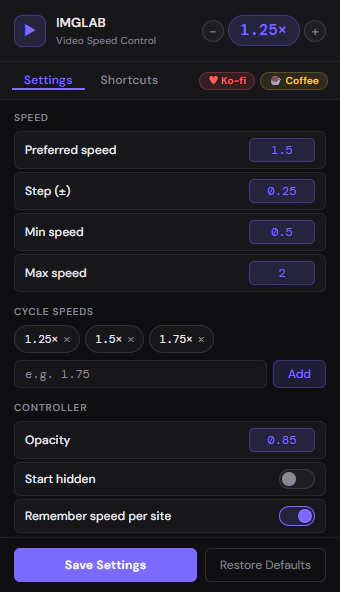
Everything Configurable in One Clean Panel
The popup opens on the Settings tab by default — where you configure preferred speed, step size, min/max limits, cycle speeds, controller opacity, and per-site memory. Changes apply instantly to the active tab without a page refresh.
- ✓ Preferred speed, step (±), min and max — all configurable
- ✓ Cycle speeds chips — add and remove with one click
- ✓ Header speed badge with − and + for instant adjustment
- ✓ Double-click speed badge → toggle 1× ↔ preferred speed
- ✓ Controller opacity, start hidden, remember speed per site
- ✓ Save Settings + Restore Defaults in sticky footer
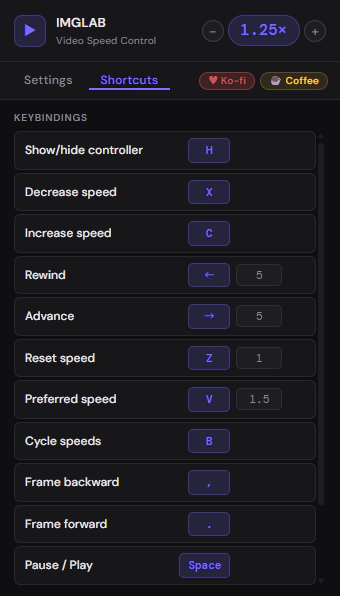
Every Shortcut Remappable From the Popup
The Shortcuts tab lists all 13 default keybindings. Click any key badge to record a new key — it turns purple and shows “…” while listening. Press Escape to cancel. Hover a row to reveal the ↺ reset button. Value fields show timing and speed amounts for actions that need them.
- ✓ Click any key badge to start recording — press any key to save
- ✓ Escape cancels recording without changing the current key
- ✓ Value inputs for rewind, advance, volume, and speed actions
- ✓ ↺ reset button per row (hover to reveal)
- ✓ Scrollable list — all 13 bindings visible in a compact view
- ✓ Changes apply immediately after Save Settings
A sleek [ − ] [ 1.50 ] [ + ] [ × ] controller attaches to every video automatically. Drag it by grabbing the speed number. Double-click to toggle between 1× and your preferred speed. Built inside a shadow DOM — immune to page style interference.
Speed up, slow down, reset, cycle favourites, rewind, advance, frame step, volume, pause — all from the keyboard. Every binding is remappable from the popup. Works with capture-phase interception so shortcuts fire even if the page tries to swallow keys.
Every site remembers its own speed. YouTube at 1.5×, lecture sites at 2×, movies at 1× — each hostname stores its last used speed in chrome.storage.sync. New sites start at your preferred speed automatically.
Press B to step through your configured cycle list (default: 1.25× → 1.50× → 1.75×). If your current speed isn’t in the list, it jumps to the nearest then continues cycling. Fully customisable from the Settings tab.
Pause any video and use , / . to step one frame at a time (assumes 30fps, ~33ms per step). Works on any site. On YouTube the keys are intentionally passed to YouTube’s native frame stepper for better accuracy.
Some sites (including YouTube) reset playbackRate when a new video loads. IMGLAB listens for the play event and immediately re-applies your speed if the site changed it behind your back — no more surprise speed resets.
All 13 shortcuts work on any site with a <video> element. On YouTube, keys that duplicate YouTube’s native shortcuts (arrows, space, comma, period) are intentionally passed through to YouTube’s own handler — so YouTube’s seek animations, progress bar, and keyboard UI continue working perfectly. Speed control keys always work on YouTube.
Runs in the isolated extension context with Chrome API access. Loads your saved settings and per-site speed, passes them to the page via a <script type="application/json"> data tag, then injects inject.css and inject.js into the real page context. Also bridges all messages between the page and the extension.
Runs in the actual page context. Scans for <video> elements using querySelectorAll, filters out small thumbnails and YouTube hover-preview cards, then attaches a shadow DOM controller to each qualifying video. A MutationObserver watches for dynamically added or removed videos — catching infinite scroll, SPA routing, and lazy-loaded players. Re-scans at 1s and 3s after load for late-loading video elements.
Each overlay is rendered inside a shadow DOM (mode: 'open') — completely isolated from the page’s styles. The wrapper has pointer-events: none so it never blocks clicks on the video, while pointer-events: auto is set inside the shadow on #ctrl, buttons, and the drag handle — ensuring the overlay is fully interactive without leaking into the page.
Handles all chrome.storage.sync operations, per-site speed memory (sitesSpeeds object keyed by hostname), and the speed badge on the extension toolbar icon. Stores all settings so they sync across devices and survive browser restarts. The popup communicates exclusively through the service worker for all storage reads and writes.
YouTube is a Single Page Application. When you click a video from a subscription page, YouTube doesn’t remove and re-add the <video> element — it reuses the same element and moves it to a new parent container. Our MutationObserver never fires. IMGLAB solves this by listening for YouTube’s own yt-navigate-finish event, detecting stale controllers (wrapper in wrong parent → invisible rect), re-attaching to the correct parent, and re-applying speed.
YouTube’s Space, arrow, comma, and period handlers take 80–100ms to run. A naive “observe 80ms then act” approach causes double-firing — both our handler and YouTube’s fire on the same keypress. Instead of a fragile timing race, IMGLAB simply skips these keys on YouTube entirely. YouTube’s seek animation, +5s bubble, progress bar, and frame stepping all work exactly as intended — while our speed control keys remain fully active.
When you hover a YouTube video thumbnail, YouTube plays a preview clip inside the card. IMGLAB blocks overlay attachment on these in two ways: a minimum size check (< 200×100px) and an ancestor tag check for YTD-VIDEO-PREVIEW. The size check alone is not reliable on large screens where thumbnails can exceed the threshold — the ancestor check is the definitive guard.
Between SPA navigations, before yt-navigate-finish fires, there’s a brief window where our controllers Map still has entries but videos are being moved. A document.contains(video) live-video guard in the keyboard handler prevents this stale state from eating key events during the transition — arrow keys always reach YouTube during navigation.
Watch content at 1.5× — the default preferred speed. Speed badge on the extension icon updates in real time.
Lecture content plays at 2× automatically whenever you open a course. Never set it twice.
Movies at normal speed. Each site’s memory is independent — changing Netflix never affects YouTube.
Sites you visit for the first time start at your configured preferred speed — no manual setup needed.
{ "hostname": speed } in chrome.storage.sync under the sitesSpeeds key — synced across all your Chrome profiles automatically. Toggle “Remember speed per site” in Settings to disable it globally.Press B to cycle speeds. If your current speed isn’t in the cycle list, findIndex returns -1, so (-1 + 1) % length = 0 — it jumps to the first cycle speed and continues from there. Never gets stuck on an off-list speed.
On non-YouTube sites, Space, Comma, and Period use an 80ms observe delay — checking if video.paused or currentTime changed. If the site already handled the key, we step back. If nothing happened, we act. Prevents double-firing on any site with its own player keyboard handler.
Keyboard shortcuts never fire when you’re typing in an <input>, <textarea>, <select>, or any contentEditable element. The isTypingContext() check runs before every keydown — no accidental speed changes while searching or commenting.
The initial scanVideos() runs on DOMContentLoaded, then again at +1s and +3s after load. A MutationObserver catches videos added dynamically at any time. Every real-world video loading pattern is covered — including infinite scroll, iframe embeds, and JS-rendered players.
The extension sets video.playbackRate directly on the HTML5 video element. DRM-protected streams (Netflix, Disney+, Prime Video) typically reset this via their player SDK. Speed control may not persist on these sites. This is a platform restriction, not a bug.
The overlay wrapper uses position: absolute inside the video’s parent. On sites where the video parent has unusual positioning or overflow settings, the overlay may appear offset. The extension has been tested primarily on YouTube and standard HTML5 players.
The extension targets native <video> HTML elements. Sites that wrap video in Flash-style objects, use WebGL rendering, or proxy through non-standard elements won’t be detected. This covers the vast majority of modern video sites.
Frame-by-frame navigation steps by 1/30s (33ms) — assuming 30fps. For 24fps, 60fps, or other frame rates, this step size will be slightly off. The browser does not expose the video’s actual frame rate through the HTML5 API.
Click Add to Chrome — Free above. The extension installs from the Chrome Web Store instantly. No sign-up, no permissions beyond what’s needed.
Go to YouTube, a lecture site, a news site — anywhere with a <video> element. The overlay appears automatically in the top-left corner of the video.
The overlay updates in real time. Press V to jump to your preferred speed, Z to reset to 1×, B to cycle through favourites.
Click the IMGLAB icon in your toolbar. The Settings tab opens by default — adjust preferred speed, step size, cycle list, and controller opacity. Remap any shortcut in the Shortcuts tab.
FREE · OPEN · COMMUNITY-SUPPORTED
Keep IMGLAB Alive & Updated
IMGLAB Video Speed Control is completely free. No ads, no data collection, no subscription. Every fix — YouTube SPA navigation, shadow DOM pointer events, smart key timing — took real research and debugging time. Your support funds all of it.
One-time · Any amount · No account needed · 30 seconds
Built with ❤️ by IMGLAB
Ko-fi ·
Buy Me a Coffee ·
[email protected]