
SharpMoment
AI
AI-powered video frame extractor that detects subjects and faces, scores sharpness on the person not the background, and evaluates face quality on every candidate. Rewards close-up hero moments and picks one perfect frame per time window — GPU accelerated, 4K ready, no duplicates.
GPU accelerated
Full body · Face only
YOLO · InsightFace · NMS
one peak per window
Drop Your Video. See the Subject Detected Instantly.
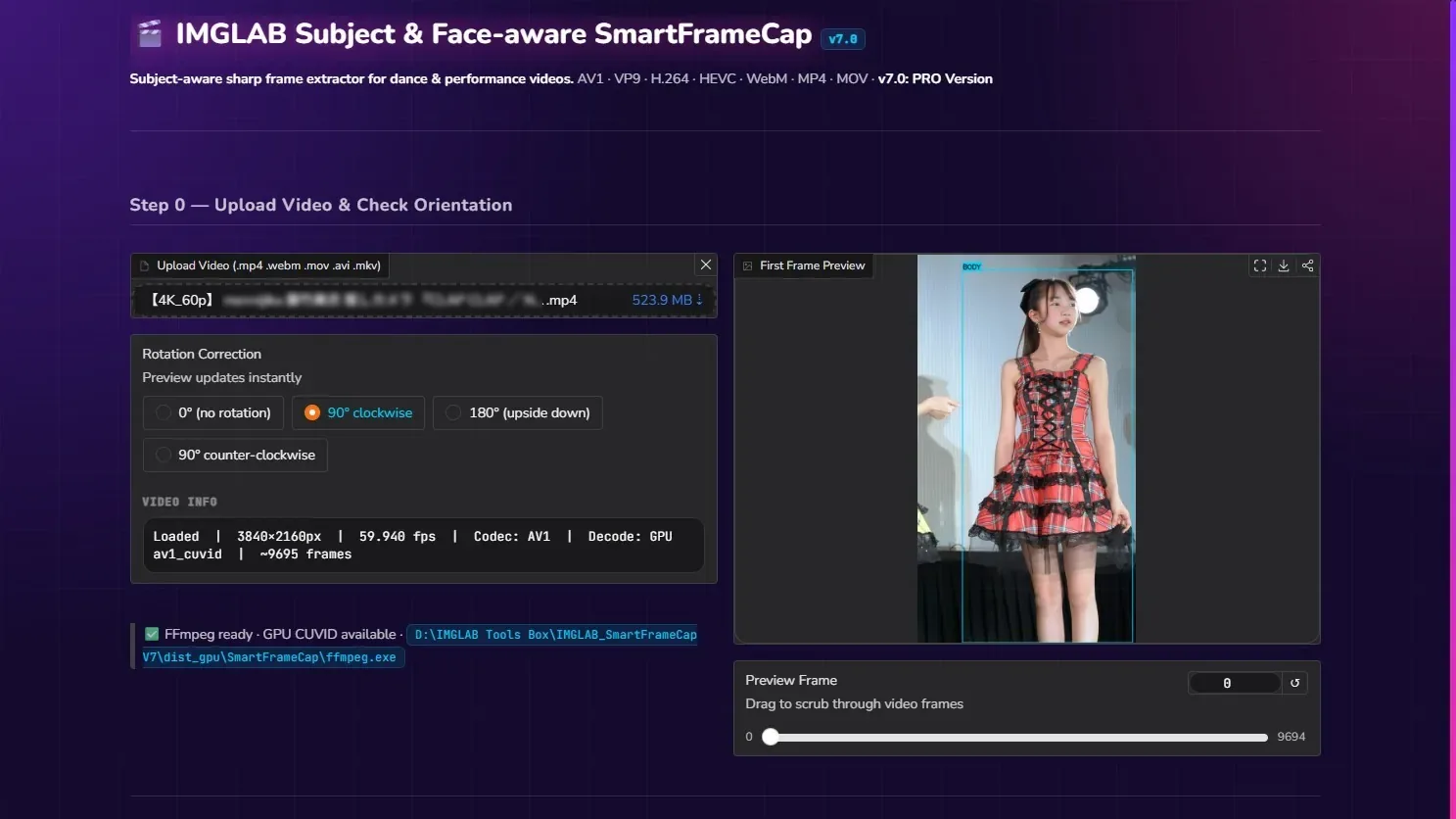
Upload any 4K, 1080p, or vertical video. SharpMoment AI reads codec metadata, configures GPU hardware decode automatically, and shows you the first non-black frame with a live detection box drawn around the subject. Drag the scrubber to check any frame before running analysis — the YOLO box updates in real time.
- ✓ Supports MP4, WebM, MOV, MKV, AVI — AV1, VP9, H.264, HEVC codecs
- ✓ GPU CUVID hardware decode detected and configured automatically
- ✓ Live YOLO detection box updates as you scrub the preview slider
- ✓ Rotation correction — 0° / 90°CW / 180° / 90°CCW
- ✓ Auto-skips black fade-in frames to show the first real content
- ✓ Full codec info: resolution, FPS, frame count, decoder mode
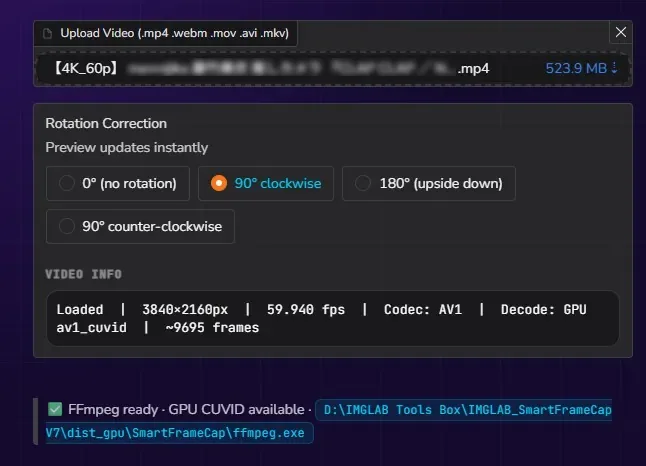
When running on the GPU build, FFmpeg uses NVIDIA CUVID hardware decoders for AV1, VP9, H.264, HEVC, VP8, and MPEG2. Pass 1 on a 4K AV1 file completes in ~3 minutes. The bundled FFmpeg 7.1.1 static build is pre-verified — no install, no PATH setup required.
Pass 1: Scan Every Frame. Score Every Subject.
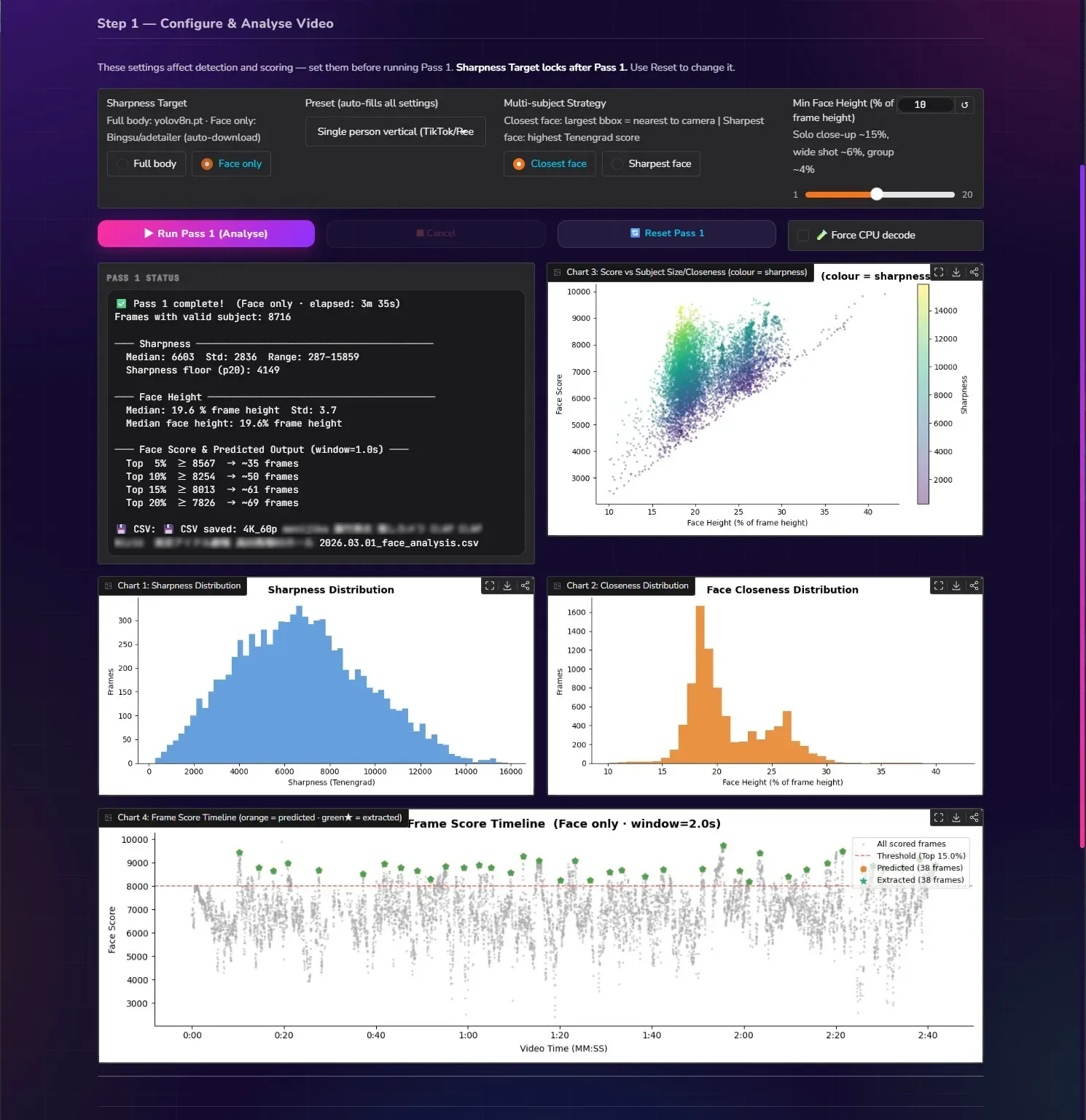
Run Pass 1 once per video. The app scans every frame with YOLOv8, crops the detected subject bbox, measures Tenengrad sharpness on that crop only, and saves the full analysis to a CSV. Four interactive charts give you complete visibility into your footage — sharpness distribution, face closeness spread, score vs size scatter, and a full timeline of every scored frame.
- ✓ Threaded FFmpeg decode + YOLO inference pipeline — overlapped, no stall
- ✓ 8,716 frames with valid subject detected in 3m 35s on 4K AV1
- ✓ Sharpness floor (p20) automatically disqualifies the blurriest 20%
- ✓ CSV saved to
data/— reload anytime without re-running Pass 1 - ✓ Face mode: median face height used for self-calibrating closeness bonus
- ✓ Full stats: sharpness median/std/range, face height, predicted frame counts
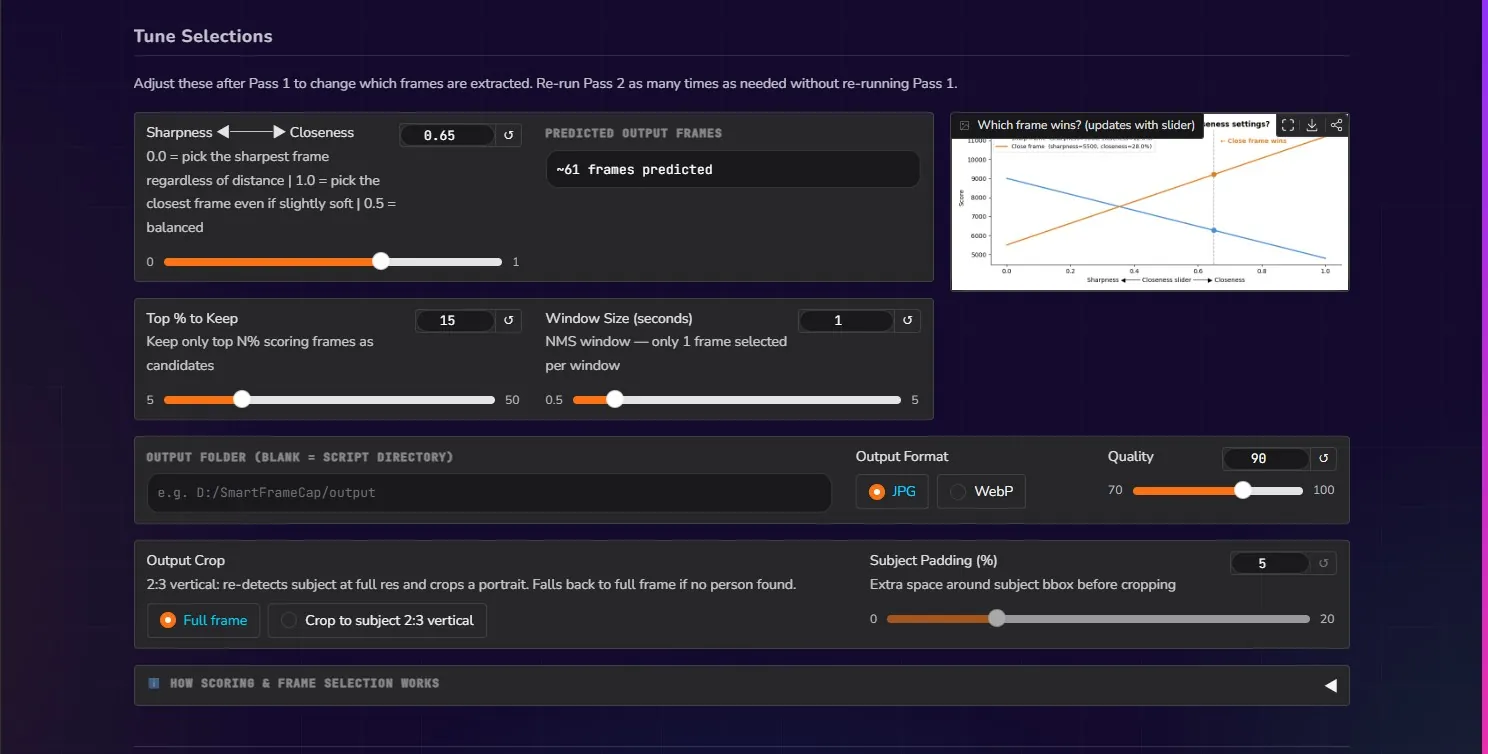
Dial In Your Settings. Re-Extract Instantly.
After Pass 1, tune all extraction parameters without re-running analysis. The Closeness slider recomputes scores live — the predicted frame count and timeline update in real time as you drag. Run Pass 2 as many times as you like with different settings: more frames, fewer frames, tighter windows, looser thresholds.
- ✓ Sharpness ◀──▶ Closeness slider — live score recomputation
- ✓ Top % to keep + NMS window size — predicted count updates instantly
- ✓ Output Crop — full frame or 2:3 vertical portrait (auto-detects subject)
- ✓ Subject Padding slider for portrait crop breathing room
- ✓ Output format JPG or WebP, quality 70–100
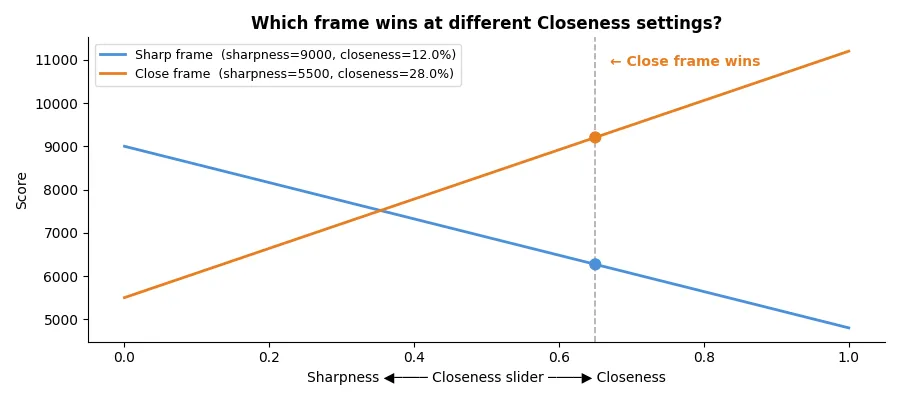
- ✓ Explainer chart shows exactly which frame wins at each slider setting
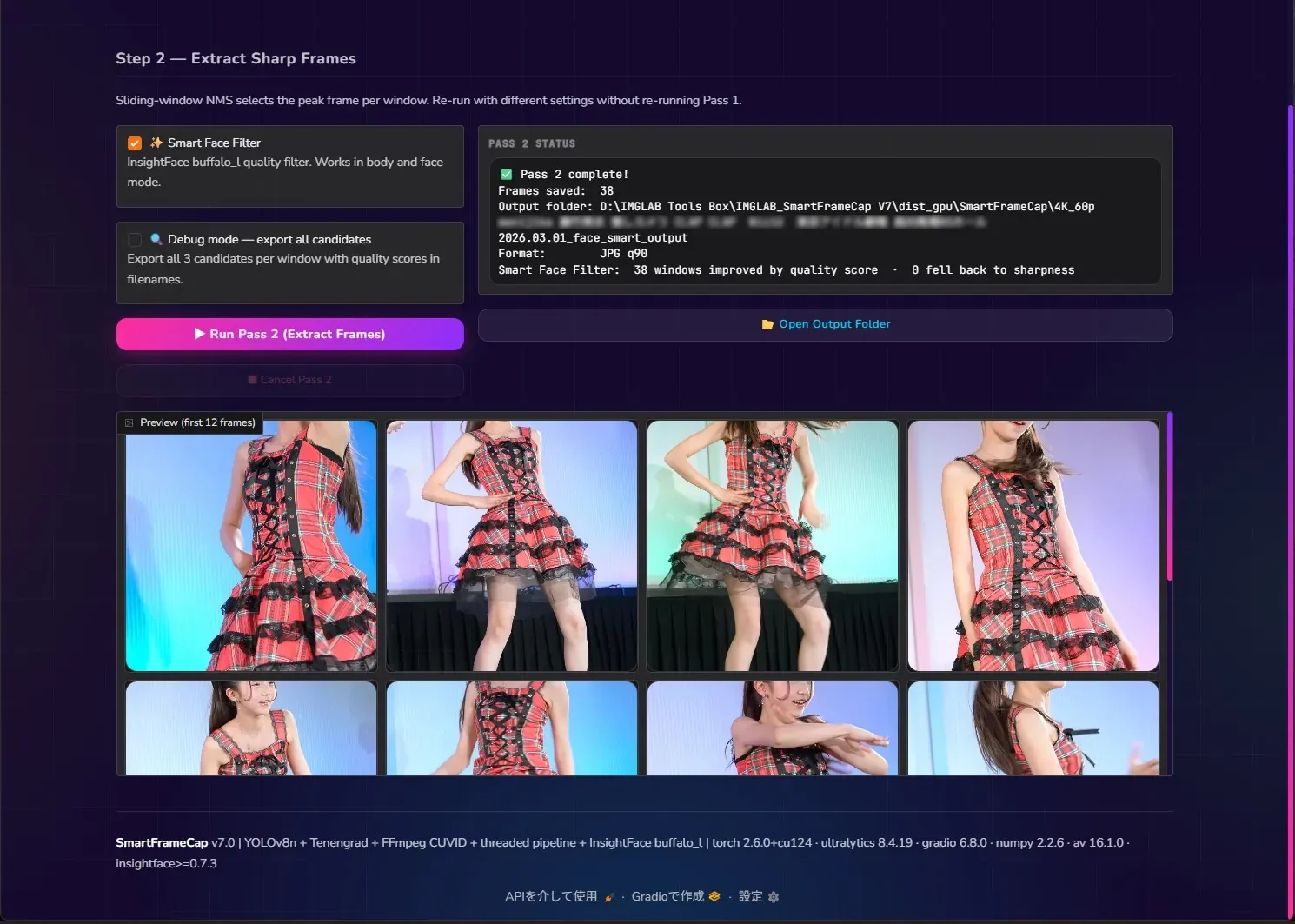
Pass 2: Frame-Accurate Seek. Smart Face Filter.
Pass 2 uses FFmpeg’s select=eq(n,N) filter to seek frames by index — not timestamp arithmetic. Every extracted frame exactly matches what Pass 1 scored. With Smart Face Filter on, InsightFace buffalo_l evaluates 3 candidates per window and picks the one with the highest face quality embedding norm — selecting the sharpest, most forward-facing expression automatically.
- ✓ 38 frames saved at 4K · JPG q90 in under 3 minutes
- ✓ Smart Face Filter: 38/38 windows improved by InsightFace quality score
- ✓ Debug mode: export all 3 candidates with quality scores in filenames
- ✓ Gallery preview of first 12 extracted frames inline
- ✓ Open Output Folder button — jumps directly to saved files
- ✓ Cancel at any point — partial results are saved
Every other tool scores sharpness on the full frame — but a sharp background with a soft subject is useless. SharpMoment AI crops the detected subject bbox before measuring Tenengrad gradient energy. Only the person’s sharpness matters. Tested and confirmed: sharp frames score 1.6–1.9× higher than adjacent blur frames from interpolated 60fps video.
InsightFace buffalo_l’s ResNet50 recognition model generates a quality embedding for each face candidate. The L2 norm of that embedding naturally captures sharpness, frontal pose, occlusion, and face size in a single learned scalar. Between three candidates per window, the highest norm wins — detecting blur, profile angles, and partial occlusion automatically.
Non-Maximum Suppression selects the single highest-scoring frame within each time window, then suppresses all frames within ±window seconds. Dense movement — a dancer making the same pose 12 times — produces exactly one output frame per window slot. Configurable window from 0.5s to 5.0s.
A background thread runs FFmpeg CUVID decode into a bounded queue while the main thread runs YOLO inference. Decode and inference overlap completely — GPU utilisation stays high throughout Pass 1. On 4K AV1 content this cuts Pass 1 time from ~5min (sequential) to ~3min (threaded).
Pass 2 can re-detect the subject at full resolution and crop a portrait frame automatically. Crop sizing starts from the subject bbox, not the full frame — delivering tight, well-framed portraits at any source resolution. Edge handling uses clamp-and-slide to preserve the 2:3 ratio without shrinking.
The live scoring slider trades sharpness against subject closeness without re-running Pass 1. At 0.0, the sharpest frame wins regardless of distance. At 1.0, the closest performer wins even if slightly soft. The explainer chart shows the crossover point in real time — the close-up “hero moment” wins exactly where you expect it to.
FFmpeg CUVID decodes the video to 1920px pipe resolution in a background thread. The main thread runs YOLOv8 on every frame, finds the subject bbox, crops it, and measures Tenengrad sharpness on that crop. In Face only mode, all raw face data is stored and median face height is computed after the full scan — enabling the self-calibrating closeness bonus. Results save to data/videoname_face_analysis.csv next to the exe. Pass 1 never needs to run again unless settings change.
Combined scores are never baked into the CSV — they’re recomputed from raw sharpness and subject size columns at NMS time using the current Closeness slider value. Moving the slider immediately updates scores, predicted frame count, and the timeline chart. The CSV column is written for human readability only and is never used for ranking. Load a saved CSV anytime and pick up exactly where you left off.
NMS selects the winning frame indices. FFmpeg seeks each using select=eq(n\,N) — the same sequential counter used by Pass 1’s pipe iterator. No timestamp arithmetic, no fps conversion, no pre-seek. The frame index from Pass 1 maps exactly to frame N in the select filter. This was a critical design decision: timestamp-based seeking was confirmed to land consistently on the wrong frame (frame+1) for VP9 interpolated content.
When Smart Face Filter is enabled, NMS runs at window/3 to generate 3 candidates per original window slot. All 3 are sought at full resolution and scored by InsightFace buffalo_l. The winner is the candidate with the highest embedding norm — capturing sharpness, frontal pose, and occlusion as a single learned quality signal. In debug mode all 3 candidates are saved with quality scores embedded in filenames so you can audit every decision.
Four Charts — Complete Visibility Into Your Footage
After Pass 1, four matplotlib charts give you a complete view of your footage’s sharpness landscape, subject closeness distribution, score correlations, and the full frame selection timeline. All four are live — adjusting the Closeness slider or NMS settings updates the timeline chart in real time without re-running Pass 1.
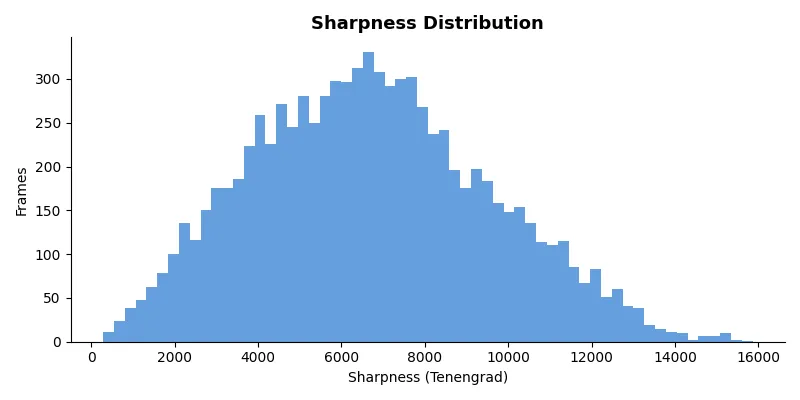
Histogram of Tenengrad scores across all frames with a valid subject. Reveals how sharp your footage actually is — a narrow peak suggests consistent focus; a long right tail means standout moments exist.
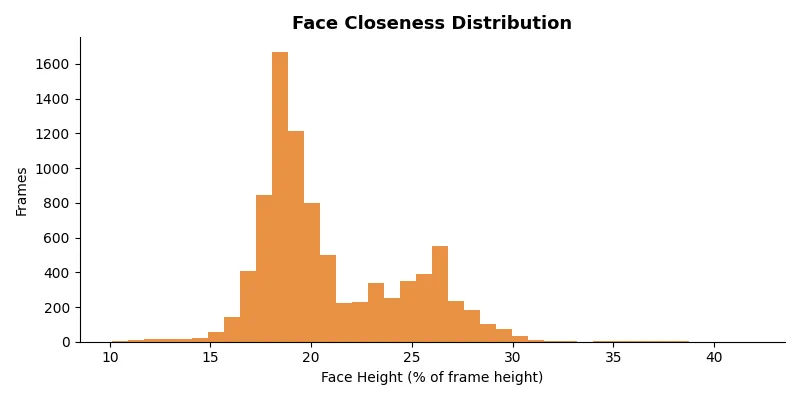
Face height as % of frame height across all detected faces. Shows performer proximity patterns — the bimodal shape here reveals a mid-distance cluster at 18–20% and a close-up cluster at 25–27%.
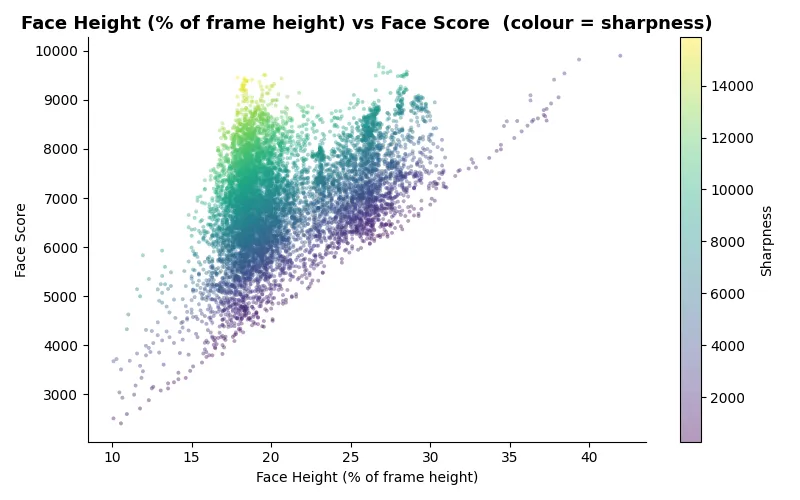
Scatter plot of face/body closeness against combined score, coloured by sharpness. The bright yellow cluster (top-left) shows sharp close-up moments — your best candidates at any closeness setting.
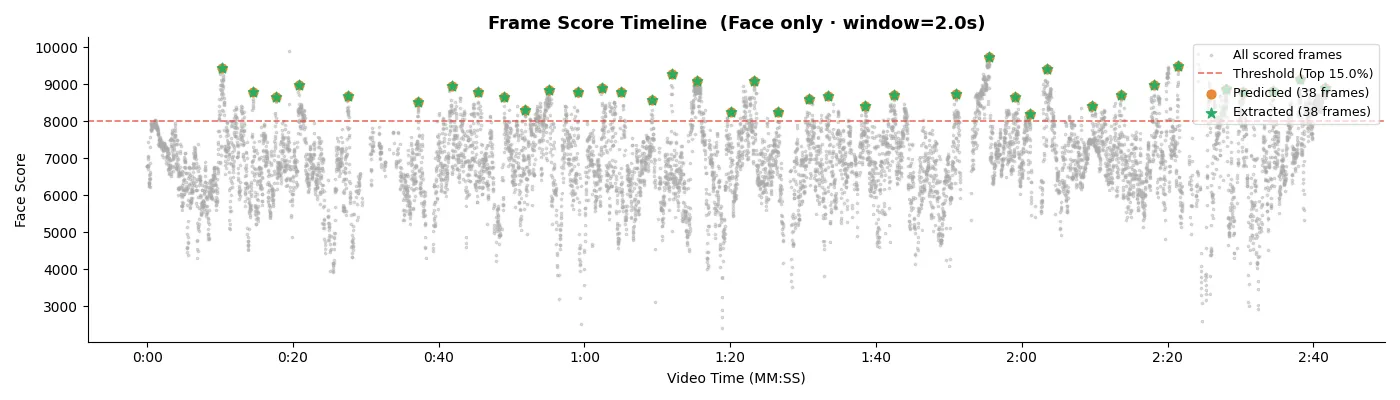
Full video timeline showing every scored frame (grey), NMS threshold (red dashed), predicted selections (orange), and extracted frames (green stars). 38 evenly distributed selections across 2m 40s of footage.
buffalo_l’s w600k_r50.onnx recognition head was trained on millions of face images. Clean, sharp, forward-facing faces produce high-magnitude embeddings because the model has more discriminative signal. Blurry, angled, or partially occluded faces produce lower norms. Quality range: 15.0–25.0 (higher = better).
det_score is detection confidence — it only measures how sure YOLO is that a face exists. All three candidates consistently score 0.7–0.9 with no meaningful spread, making winner selection essentially random. The embedding norm gives clear separation between candidates in the same window.
Embedding norm captures: face visibility / occlusion, image sharpness on the face region, pose deviation from frontal, and face size. Known limitation: closed-eye detection. A frame with closed eyes but sharp may outscore an identical open-eye frame. Future version will layer in EAR (Eye Aspect Ratio) as a disqualifier.
Smart Face Filter runs NMS at window/3 internally, generating 3 candidates per original window slot. All 3 are sought at full resolution via GPU CUVID, scored by InsightFace, then the winner is written to disk. Output frame count matches a normal Pass 2 run — quality improves without increasing output volume.
_winner suffix, losers get _qN.NNN quality scores in filenames, no-face detections get _qnone. Audit every decision the algorithm made before committing to a non-debug run.av1_cuvid
✅ GPU
vp9_cuvid
✅ GPU
h264_cuvid
✅ GPU
hevc_cuvid
✅ GPU
vp8_cuvid
✅ GPU
mpeg2_cuvid
✅ GPU
nv12→bgr24 conversion for VP9 content with reserved color space metadata, producing zero decoded frames. The bundled version is the correct one to use.Optimised for vertical video of one performer. Face mode with high closeness weight — rewards hero close-up moments. Min face height 10% ensures realistic face detection thresholds for TikTok footage.
Wider shots with two performers. Sharpest face strategy favours technical clarity. Lower closeness weight prevents either performer’s momentary close-up from dominating selection.
Large group stage performances. Max strategy on body mode ensures any sharp subject can win. Very low closeness weight prevents the nearest performer from monopolising all output frames.
Single dancer with significant stage movement and distance variation. Balanced closeness weight captures both distant full-body poses and closer detail moments equally.
Full GPU acceleration for YOLO inference, FFmpeg CUVID hardware decode, and Gradio UI. Pass 1 on 4K AV1 completes in ~3 minutes. Recommended for any machine with a compatible NVIDIA card.
YOLO inference runs on CPU — ~5–10× slower per frame than GPU, Pass 1 ~8–12 minutes on 4K content. FFmpeg CUVID decode still uses the GPU if available. Works on any Windows machine regardless of GPU model.
~/.insightface/_internal/http://127.0.0.1:7860 in your default browserTenengrad: mean(Sobel_x² + Sobel_y²) on subject bbox crop at 1920px pipe resolution. Confirmed: sharp frames score 1.55–1.82× higher than adjacent blur frames on VP9 60fps interpolated content.
YOLOv8n for body/person detection, face_yolov8n.pt (Bingsu/adetailer) for face detection. Confidence threshold 0.4 for Pass 1 scoring, 0.25 for preview. Auto GPU/CPU device detection at startup.
Source at or below 1920px runs at native resolution — never upscaled. 4K downscales to 1920px for YOLO (4× faster). Crop output taken from full-resolution sought frames — no quality loss at output.
score = sharpness × (1−cw) + (face_h / median_face_h) × cw × median_sharpness. The face height bonus is normalised against the video’s own median — self-calibrating across any venue or camera distance.
score = sharpness × ((1−cw) + cw × log_curve(body_area%)). Log curve: max(0.1, log1p(x) / log1p(50) × 1.7). At 5% area: ×0.70; at 20%: ×1.30; at 50%: ×1.70.
Pass 2 uses select=eq(n\,N) FFmpeg filter — no timestamp arithmetic, no pre-seek, 120s timeout for long GOP VP9/AV1. The frame index from Pass 1’s sequential pipe counter maps exactly to n=N in the select filter.
Support the project via Ko-fi or Buy Me a Coffee.
Double-click SmartFrameCap.exe. A console window shows startup info — YOLO device (GPU/CPU), FFmpeg path, and GPU CUVID status. The Gradio UI opens automatically at http://127.0.0.1:7860.
Drop your video in Step 0. Preview the detection box — adjust rotation if needed. Switch to Face only mode for dance/idol content. Select a preset from the dropdown. YOLOv8 models download automatically on first use.
Click ▶ Run Pass 1. Watch the progress bar and ETA. Charts fill in as Pass 1 completes. The CSV saves automatically — you can reload it later without re-running. Pass 1 runs once per video.
Adjust the Closeness slider, Top %, and Window Size in the Tune Selections section. Enable Smart Face Filter for quality-scored extraction. Click ▶ Run Pass 2 — extracted frames appear in the gallery. Open Output Folder to access your files.
SharpMoment AI uses YOLOv8 (AGPL-3.0) and InsightFace buffalo_l (MIT). Under AGPL-3.0, distributing a closed-source commercial build without purchasing an Ultralytics commercial license is not permitted. SharpMoment AI is therefore available on a donation basis only — not for sale. The donation model is fully compliant with AGPL-3.0.
DONATION-BASED · NO SUBSCRIPTION · WINDOWS
Support SharpMoment AI
SharpMoment AI is the result of months of research into frame-accurate seeking, VP9 codec quirks, InsightFace quality signals, and GPU pipeline optimisation. Every bug you don’t hit was a debugging session that happened. Your donation funds continued development and maintenance.
One-time · Any amount · Download link sent after donation · No subscription
Built with ❤️ by IMGLAB
Ko-fi ·
Buy Me a Coffee ·
[email protected]