IMGLAB
Weibo Downloader
One-click download of original-resolution images and videos from every Weibo post — on weibo.com and s.weibo.com search results. No watermarks, no quality loss, no sign-up. Free forever.
weibo.com · s.weibo.com
image · video · live · mixed
no compression
100% free
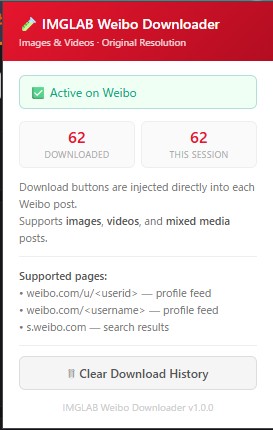
Download Buttons Injected Right Into the Feed
The extension injects a red “Download” button directly into every Weibo post card — no pop-ups, no menus. Click once and all images and videos in that post download automatically to your weibo/{username}/ folder with clean, meaningful filenames.
- ✓ Per-image circle badges on every thumbnail
- ✓ Lightbox viewer badge — download the enlarged image directly
- ✓ Download history tracking — already-downloaded posts show “Downloaded ✓”
- ✓ Session + total download counter in popup
- ✓ Works on weibo.com feed and s.weibo.com search results
Every image is downloaded at full original resolution using Weibo’s /large/ CDN path — not the compressed thumbnail you see on screen. 9-grid posts, single images, and mixed media posts all download at their true native quality.
Videos are resolved through a 6-tier quality chain — including the Weibo TV API for 4K resolution. M3U8/HLS streams are stitched from segments natively (no external library). Direct MP4, HD streams, and live stream recordings all supported.
Weibo Live Photos download both the still image and the video track — the animated component that plays on hover. Both files saved with matching filenames.
s.weibo.com search cards are fully supported. The extension works around Weibo’s CORS restrictions by relaying requests through your open weibo.com tab context.
Files are saved as weibo/username/username-title-01.jpg. Hashtag-only posts keep the #hashtag in the filename. Retweeted posts use the retweeter’s comment text. Post ID used as final fallback — never “unknown”.
Posts that mix images and videos (mix_media_info) are fully handled — each media item in the post is detected and downloaded individually with correct file types.
A MutationObserver watches the Weibo feed for new post cards being added to the DOM — catching infinite-scroll loads, navigation, and dynamically injected content. A “Download” button and per-image circle badges are injected into each card synchronously using a dataset.imglabInjected flag to prevent duplicates.
On click, the extension calls GET weibo.com/ajax/statuses/show?id={postId} with your session cookies and XSRF token. On weibo.com, this is a direct same-origin fetch. On s.weibo.com, the request is relayed via chrome.scripting.executeScript into an open weibo.com tab — the only reliable approach to bypass Weibo’s Sec-Fetch-Site rejection of cross-origin requests.
Images are resolved to the /large/ CDN path. Videos are resolved through a 6-step priority chain: TV API (4K) → playback_list HD → mp4_hd_url → stream_url_hd → stream_url → live replay. M3U8 master playlists are parsed and the highest-bandwidth stream is selected automatically.
Images are fetched via XMLHttpRequest with withCredentials: true from the content script — running in the page’s full browser context so Weibo’s CDN authentication works correctly. The blob is converted to a blob: URL (never data:) and passed to chrome.downloads with onDeterminingFilename for reliable custom filename application.
Fetches from /tv/api/component, sorts all quality variants by pixel area (WxH from URL template param). Highest pixel area wins — this is the path to 4K for long-form Weibo TV content.
Weibo’s own HD playback URL from the API response’s playback_list[0].play_info.url.
Direct HD MP4 link included in page_info.media_info for standard video posts.
HD stream URL fallback — present on most video posts when the above sources aren’t available.
Standard SD stream. Always present as a last resort for downloadable video.
Live stream recordings (object_type === 'live') — saves the full archived HD broadcast.
Many Weibo videos (especially long-form Weibo TV content) are served as HLS streams. The extension fetches and concatenates all .ts segments using a 5-concurrent TaskQueue — no external library, no ffmpeg. Master playlists with multiple quality tiers are parsed and the highest-bandwidth stream is selected automatically. Live segment progress is shown in the button label: "32/96 segs".
username-post-caption-text-here-01.jpgusername-post-caption-text-here-02.jpgusername-post-caption-text-here-01.mp4username-#tagA##tagB#-01.jpg# is a valid filename character on Windows and macOS, so hashtag-only posts like #tagA##tagB# produce correct filenames instead of “unknown”_cover.jpg alongside the video file.
Every image thumbnail gets a small circular download badge in the top-right corner. Hover to reveal it — click to download just that single image without triggering a full post download.
- ✓ Badge uses URL stem matching — not fragile DOM index counting
- ✓ Works correctly even when Weibo shows “+N more” overlay tiles
- ✓ Live photo placeholders (SVG data URI) correctly resolve to real poster image
- ✓ Lightbox viewer: large badge replaces small one when post is expanded
- ✓ s.weibo.com viewer badge persists through left/right image navigation
- ✓ Badge states: idle → loading → done ✓ → error (click to retry)
Per-image badges · “Download All” footer button
pic_infos — original /large/ resolution
mix_media_info handled individually
page_info.media_info with 6-tier quality chain
pic.video
replay_hd field
retweeted_status, slug from retweeter’s comment
Weibo’s CDN (sinaimg.cn) checks Sec-Fetch-Site and session cookies. Only content script XHR — running in the page’s own browsing context — passes these checks. Background fetch returns 403. This is why most competing tools fail.
On s.weibo.com, sinaimg.cn only allows weibo.com origin. The extension relays all requests through chrome.scripting.executeScript injected into your open weibo.com tab — running as weibo.com origin with correct cookies and CORS.
Downloads use URL.createObjectURL(blob) instead of data: URLs. Only blob URLs trigger Chrome’s onDeterminingFilename event — the only reliable way to apply custom filenames in MV3. data: URLs silently ignore the filename parameter.
Per-image badges identify their target by extracting the filename stem from the thumbnail URL at inject time. At download time, the stem is matched against the download list — immune to Weibo’s “+N more” overlay tile count mismatches.
Large video files are base64-encoded in 8 KB chunks using String.fromCharCode.apply — the naive char-by-char loop overflows the JS call stack on large files. The chunked approach handles 4K video segments of any size safely.
The Referer and Origin headers for CDN requests are injected at the network level via rules.json — not in XHR code. Referer is a browser-forbidden header that XHR silently drops; declarativeNetRequest bypasses this restriction correctly.
When downloading from Weibo search results (s.weibo.com), the extension needs at least one weibo.com tab open in the same browser window. It uses that tab to relay authenticated API and image requests. This is a fundamental constraint of Chrome’s MV3 extension model — there is no way to make authenticated cross-origin requests to weibo.com without running code inside an actual weibo.com page context.
On weibo.com itself, no extra setup is needed.
Click “Add to Chrome — Free” above. Or if installing manually, unzip the extension to a permanent folder — load it via chrome://extensions/ → Developer Mode → Load unpacked.
Make sure you are logged in to your Weibo account at weibo.com in Chrome. The extension uses your session to authenticate image and video downloads.
Go to weibo.com or s.weibo.com. Red “Download” buttons will appear automatically on every post with media. No configuration needed.
Click the red button to download all media in a post. Or click any per-image circle badge to download a single image. Files save to Downloads/weibo/{username}/.
FREE · OPEN · COMMUNITY-SUPPORTED
This Extension Lives on Your Support
IMGLAB Weibo Downloader is completely free — no ads, no paywall, no data collection. Every feature you see — M3U8 stitching, search page support, live photo downloads — took real debugging time to get right against Weibo’s authentication system.
Weibo changes their CDN and API frequently. Keeping the extension working requires ongoing maintenance. If you’ve downloaded images or videos you care about — consider buying us a coffee.
One-time · No account needed · Any amount helps · 30 seconds
Built with ❤️ by IMGLAB
Ko-fi ·
Buy Me a Coffee ·
[email protected]