
IMGLAB
YouTube Immersive
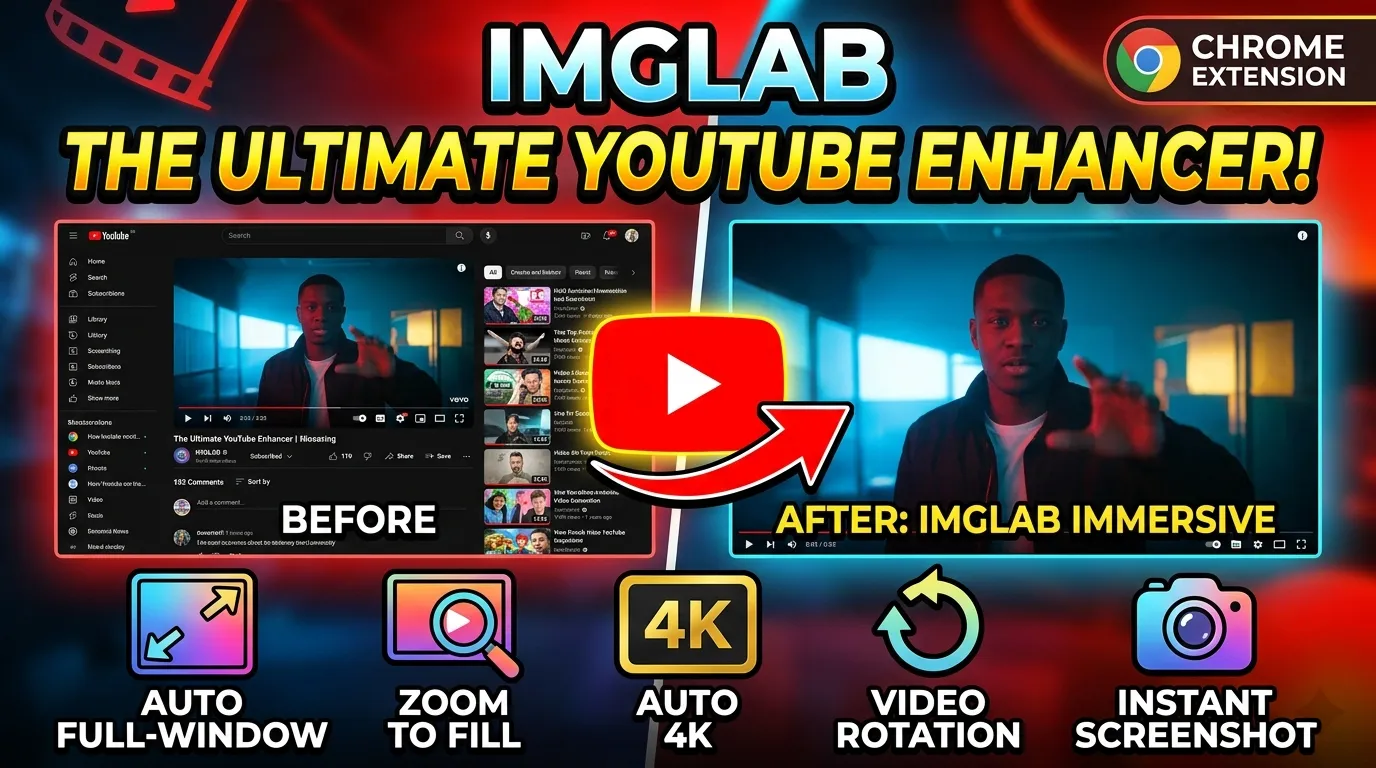
Transform YouTube into a pure, distraction-free cinema experience — auto theater mode, hidden clutter, forced 4K quality, zoom to fill any aspect ratio, video rotation, and built-in screenshot capture. One extension. Everything you need.
default setting
zoom · rotate · snap
shortcuts
required
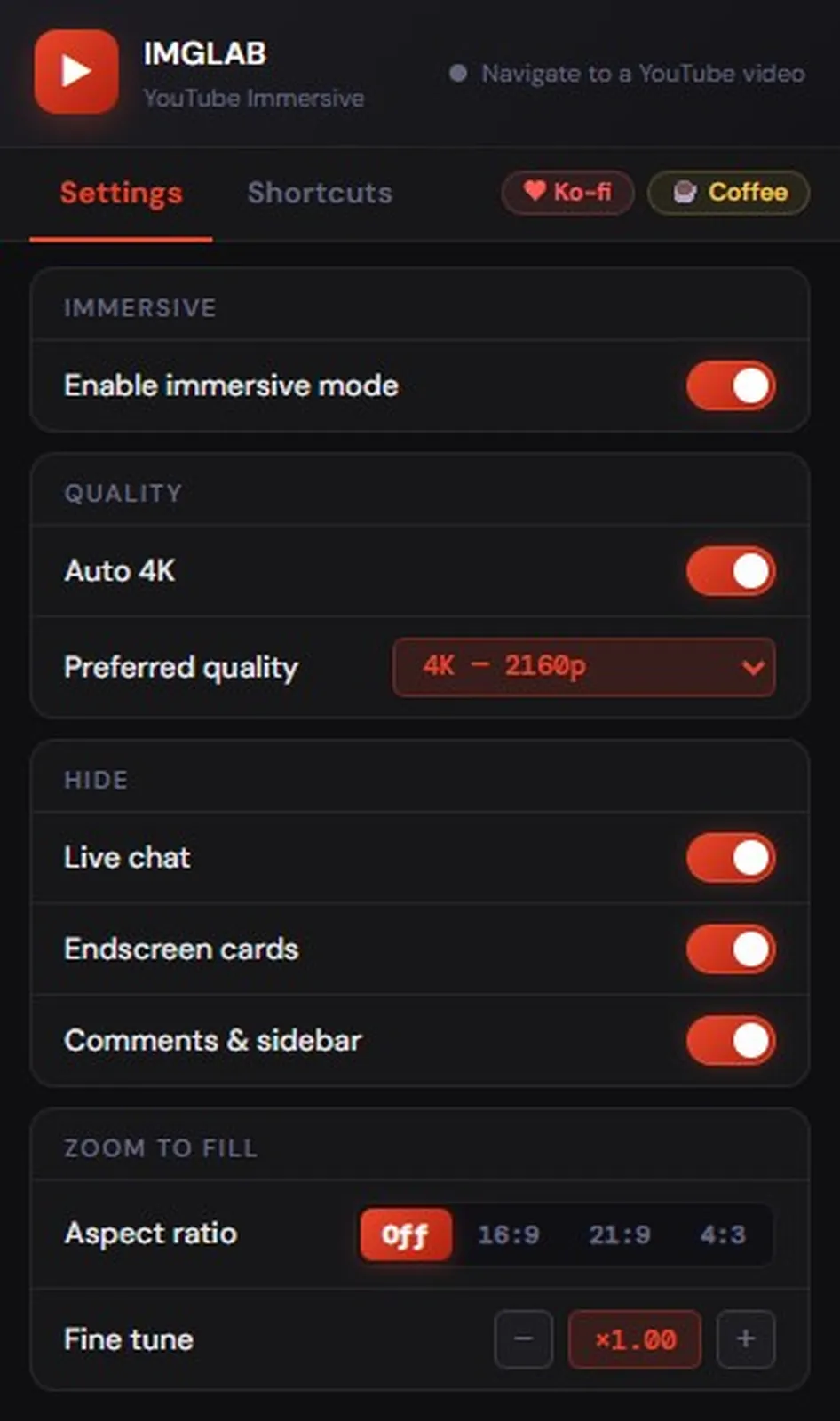
Every Feature Configurable in One Clean Panel
The popup opens on the Settings tab — cards group related settings cleanly. Toggle immersive mode, configure auto quality, hide distractions, and control zoom — all with instant live updates. No page refresh needed.
- ✓ Immersive mode master toggle — on/off persists across sessions
- ✓ Auto HD — dynamic label shows “Auto 4K”, “Auto FHD” etc.
- ✓ Hide live chat, endscreen cards, comments & sidebar independently
- ✓ Zoom to Fill — aspect ratio presets (Off / 16:9 / 21:9 / 4:3)
- ✓ Fine tune zoom ±0.1 steps · double-click to reset
- ✓ Quality badge on extension icon — 4K / QHD / FHD / HD
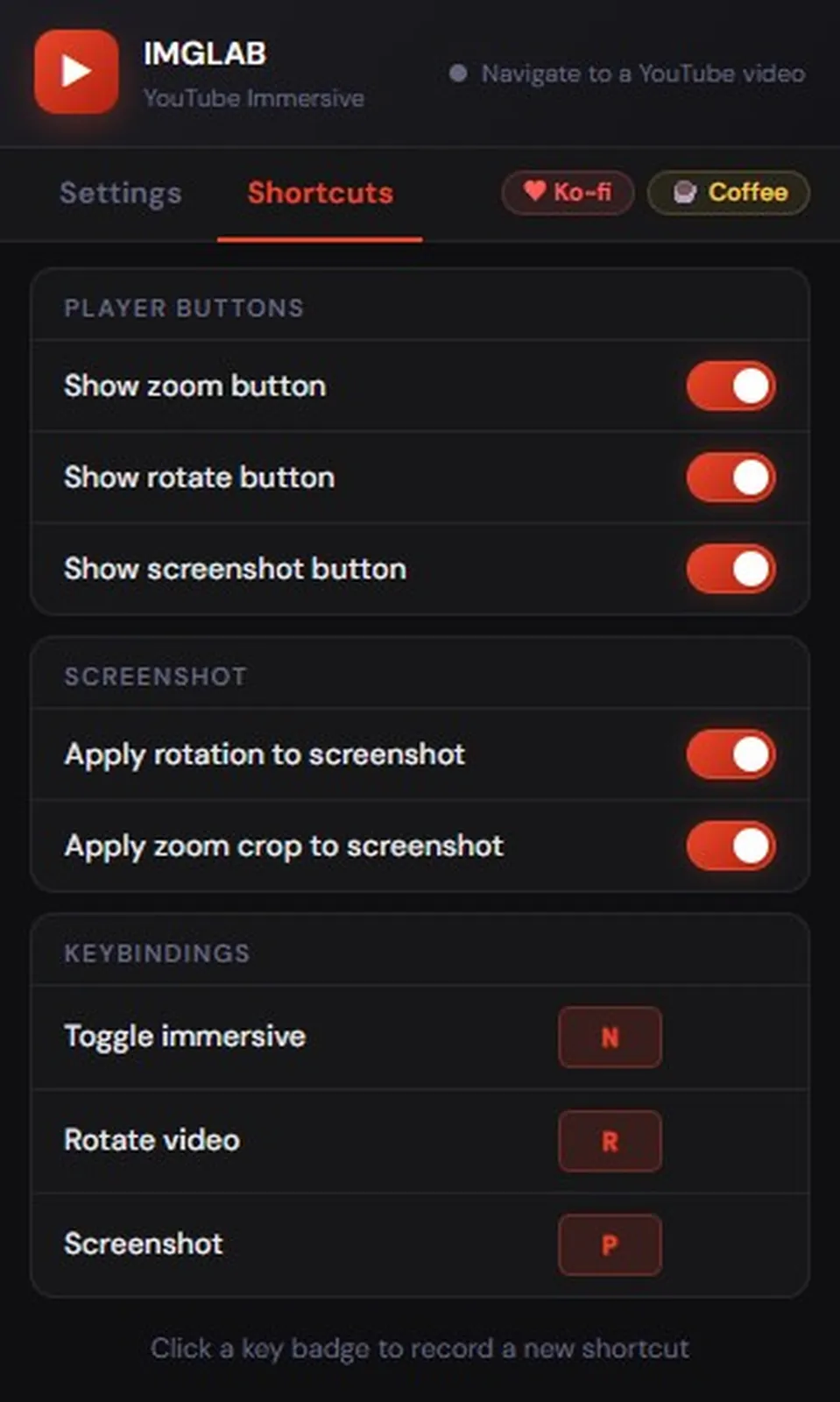
Player Buttons, Screenshot Options & Remappable Keys
The Shortcuts tab handles everything that’s set once and forgotten — which buttons appear in the player, how screenshots behave, and all three keyboard shortcuts. Click any key badge to record a new combo. Hover a row to reveal the Reset button.
- ✓ Show / hide zoom, rotate, and screenshot player buttons
- ✓ Apply rotation and zoom crop to screenshots independently
- ✓ Toggle immersive — N · Rotate video — R · Screenshot — P
- ✓ Click key badge → recording mode · press any key to save
- ✓ Supports modifier keys: Ctrl, Alt, Shift combinations
- ✓ Per-row Reset button (hover to reveal)
As soon as you open any YouTube video, the extension enters theater mode automatically — hiding the navbar, sidebar, and all surrounding clutter. The video fills your screen the instant it loads. No button press, no delay. YouTube’s SPA navigation is handled correctly via yt-navigate-finish — works on every video including playlist navigation and back-button restores.
One click on the zoom button in the player controls activates 21:9 widescreen fill — removing letterbox bars instantly. Scroll the button to fine-tune ±0.05 per scroll step. Choose from Off / 16:9 / 21:9 / 4:3 presets in the popup. Works in immersive mode and normal mode, at any rotation angle. Fine zoom and rotation are computed together in a single CSS transform — they never fight each other.
Sets your preferred quality (default: 4K / 2160p) on every video automatically using YouTube’s internal player API. Waits for quality levels to populate, picks the best available match, verifies it was applied, and retries once if not. Extension icon shows the active quality as a badge — 4K / QHD / FHD / HD / MAX — so you always know without opening the popup.
Press R to rotate 0° → 90° → 180° → 270°. The video automatically fills the player at any rotation using the correct scale formula based on rendered element dimensions — not the raw stream resolution which produces a tiny ~0.34× result. The ↺ button is injected directly into YouTube’s player controls with retry logic that survives theater mode changes and ad transitions.
Press P or click the camera button to capture a JPEG at 85% quality. Screenshots are rotation-aware (canvas rotated to match what you see) and zoom-crop-aware — using per-axis visible fractions so full resolution is preserved on the unclipped axis. A 4:3 zoom on 854×480 saves as 640×480, not 641×360. Filename includes the video title and timestamp.
Hides live chat with full column collapse (no black gap), endscreen cards, comments and sidebar — each independently toggleable. The live chat fix targets YouTube’s actual layout container (#panels-full-bleed-container) which holds its 402px column width even when chat is hidden. YouTube’s ambient glow is always killed — pure black background, no color bleed.
YouTube’s player API (getAvailableQualityLevels, setPlaybackQualityRange) only exists in the page’s own JS context (MAIN world), while Chrome APIs require the isolated world. IMGLAB uses two content scripts that communicate via CustomEvent to bridge both worlds cleanly.
Runs at document_start with full chrome.* API access. Loads settings from chrome.storage.sync before boot runs — ensuring saved preferences are applied on the first frame. Injects CSS, manages theater mode, navbar, chat collapse, rotation, zoom, and screenshot. Bridges popup messages and dispatches player settings to the MAIN world.
Runs in the page’s own JS context alongside YouTube’s internal player. Listens for imglab-player-settings CustomEvents from content.js. Waits 800ms after navigation for quality levels to populate, then calls player.setPlaybackQualityRange(), verifies 300ms later, and retries once if the quality wasn’t applied. Handles both SPA navigation and hard page loads.
Minimal service worker that only handles badge updates. When content.js sends a SET_BADGE message, background.js calls chrome.action.setBadgeText/BackgroundColor/TextColor per tab — so each YouTube tab can show a different quality badge independently. Never touches storage.
The popup always reads from chrome.storage.sync first and renders immediately — no “Loading…” flicker. Then it optionally queries the content script for live status. Only the status dot is updated from the live response — settings are never overwritten. The zoom display polls every 500ms to stay in sync when you scroll the player button while the popup is open.
Screenshots preserve resolution per-axis. fracX = playerWidth / (videoOffsetWidth × zoom) — if fracX = 1.0, that axis is fully visible and NOT cropped. Only the clipped axis shrinks. A 4:3 zoom on a 16:9 video crops only the sides, keeping full height.
Rotation scale and zoom are always multiplied together in one applyVideoTransform() call. At 90°/270°, finalScale = rotationFillScale × zoomScale. Two separate video.style.scale assignments would overwrite each other — this is never allowed.
Fine zoom floor is 1.0 / AR_SCALES[currentZoomAR] — not a hardcoded 1.0. When 21:9 is active (base scale ×1.31), fineZoom can go to 0.762 because the total is still ×1.00. Hardcoding 1.0 would completely break the minus button on any AR preset.
Single click toggles off ↔ 21:9. Scroll adjusts ±0.05 per step. Label shows the AR name when set by click (“21:9”), switches to actual ratio when scrolled (“×1.31”). Auto-resets to Off when scrolled back to ×1.00.
video.videoWidth / video.videoHeight — the stream’s actual pixels, not the shrunken display size. A 4K video saves at full 3840×2160 (before crop).
For 90°/270° output, canvas dimensions swap (portrait JPEG). ctx.translate + ctx.rotate + drawImage — the output matches exactly what you see on screen.
Per-axis fractions determine exactly what the player shows. No uniform zoom division — the full-height axis is preserved at native resolution.
{title} {m-ss}.jpg — e.g. My Video 4-32.jpg. Hours added for long videos. Title grabbed from YouTube’s own heading element.
The sole navigation trigger. Patching history.pushState — the naive approach — fires before the DOM settles and poisons the dedup guard, causing real navigation events to be silently skipped. This was diagnosed and confirmed via console timing.
YouTube rebuilds .ytp-right-controls silently during theater entry, ad transitions, and fullscreen changes. A single 500ms timeout is not enough. Four retries at 500 / 1500 / 3000 / 5000ms ensure the zoom, rotate, and screenshot buttons always reappear.
YouTube’s live theater layout uses #panels-full-bleed-container which holds its 402px column width even when chat is hidden. Targeting ytd-live-chat-frame alone leaves a black void. The fix collapses the container and forces #player-full-bleed-container to flex: 1 1 100%.
CSS scale applies to the rendered element size (e.g. 775×436px), not the stream resolution (3840×2160). Using videoWidth/videoHeight gives a 0.34× scale — a tiny video in the centre. offsetWidth/offsetHeight gives the correct 1.71× that fills the player.
The N key toggle never saves to storage — intentionally. If it did, toggling off to check comments would permanently disable immersive for every future video. The popup toggle saves persistently; the keyboard shortcut toggles only the current session.
Hides YouTube recommendation and upsell popups for 8 seconds after navigation. Only targets tp-yt-paper-dialog and ytd-mealbar-promo-renderer inside ytd-popup-container — never the container itself, which would block IMGLAB Screenshot toasts.
All three shortcuts are configured in the Shortcuts tab. Click any key badge to start recording — press any key or modifier combination. Escape cancels without changing the current key.
The extension icon shows a quality badge so you never need to open the popup just to check what quality is active. The badge is per-tab — multiple YouTube tabs can show different values simultaneously.
For monitors that can benefit from 8K downsampling
Best balance of quality and bandwidth on any screen
Great for 1440p native monitors
Full HD — reliable on most connections
Good for slower connections
YouTube chooses quality automatically
Speed Control uses a shadow DOM overlay (mode: 'open'). When immersive activates, IMGLAB hides the overlay via wrapper.shadowRoot.getElementById('ctrl').classList.add('hidden'). When immersive deactivates, it’s restored. Zero changes to Speed Control needed.
The Screenshot extension injects a button with data-imglab-btn. Our buttons use distinct classes (.imglab-zoom-btn etc.). Screenshot toasts go into document.body — our popup suppressor only targets ytd-popup-container internals, never the body. No conflicts.
Click Add to Chrome — Free above. Installs instantly from the Chrome Web Store. No sign-up, no permissions beyond YouTube.
Navigate to any youtube.com/watch?v=... page. The extension activates automatically — theater mode engages, navbar slides up, quality is set to 4K.
Press N to briefly disable immersive. Press R to rotate a vertical video. Hover the expand icon in the player controls and scroll to zoom into 21:9 content.
Click the IMGLAB icon in your toolbar. Toggle which features are active, change the quality target, remap shortcuts, and configure screenshot behaviour — all without leaving the current page.
FREE · YOUTUBE-ONLY · COMMUNITY-SUPPORTED
Keep IMGLAB Alive & Updated
IMGLAB YouTube Immersive is completely free. No ads, no data collection, no subscription. Every fix — live chat gap discovery, per-axis crop math, zoom-rotation unified transform — took real debugging time. Your support funds all of it.
One-time · Any amount · No account needed · 30 seconds
Built with ❤️ by IMGLAB
Ko-fi ·
Buy Me a Coffee ·
[email protected]